







大規模言語モデル(LLM)の進化に伴い、ユーザーのクエリを事前に定めたカテゴリへ分類する「LLMを用いたクエリ分類(LLM-based query classification)」が、実務で利用されるようになっています。[1]
カスタマーサポートなど、複数のユーザーや顧客から問い合わせを受け付けるサービス・窓口では、問い合わせの目的や必要な対応を分類することで、適切なワークフローへの振り分けや、利用傾向の把握に活用できます。従来は人手や専用の機械学習モデルで行っていた分類を、LLMへの明確な指示によって柔軟に実行できることが、この手法の利点です。
しかし、1,000件、あるいは10,000件を超える大量のデータへ適用すると、分類基準のブレ、カテゴリ間の混同、文脈不足による誤分類、APIの利用上限やネットワークエラーによる処理停止など、簡易的なテストでは表面化しにくい課題が生じます。
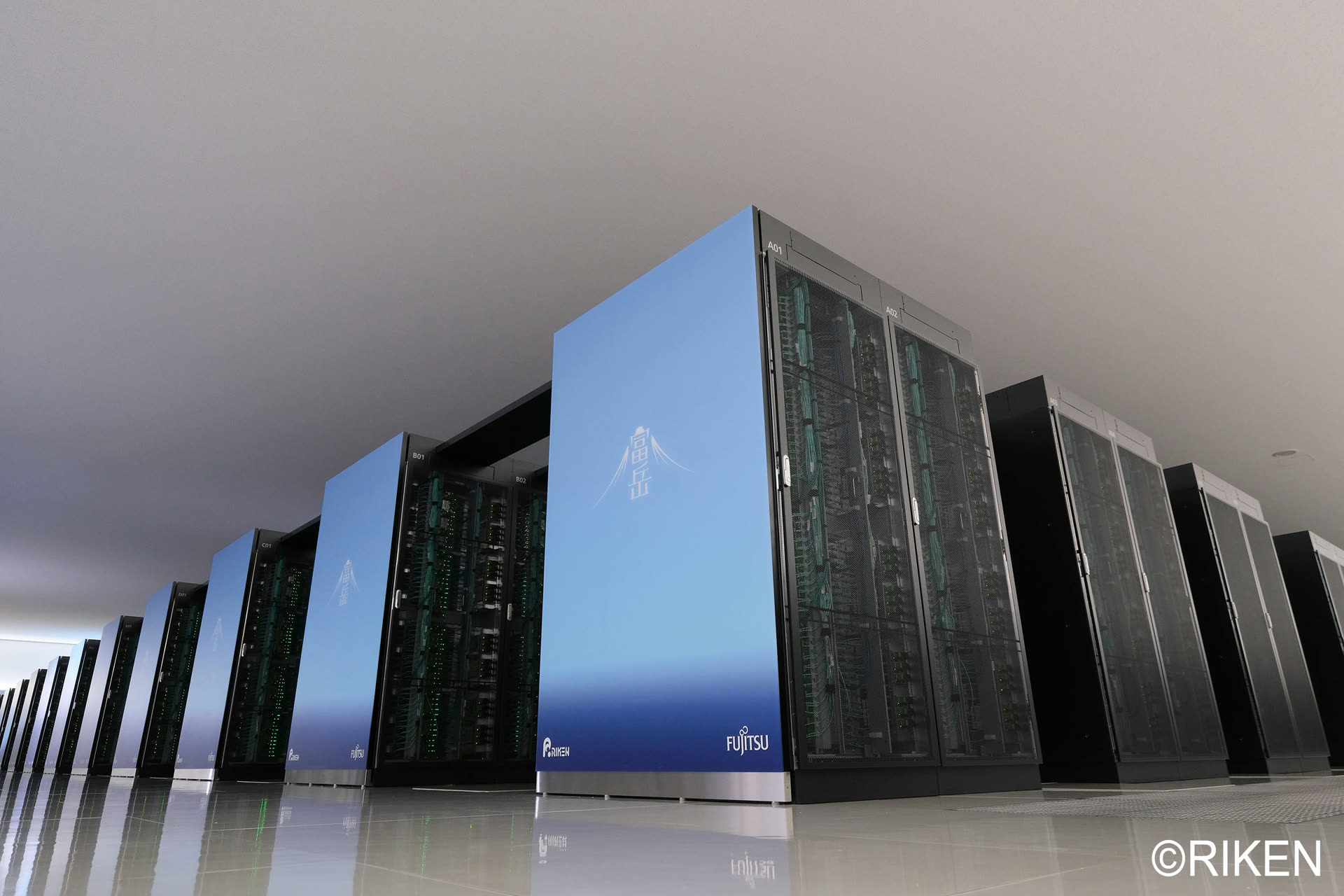
本稿では、理化学研究所 計算科学研究センター(R-CCS)が運用する「富岳サポートサイト」および「スパコン成果ナビ」という2つの実稼働チャットボットを題材とし、LLMを用いたクエリ分類をどのように実施し、分類結果の品質を確保したのか、その具体的な手順と実施上の工夫を解説します。
分析の結果はこちらのレポートに記載しています。:理化学研究所スーパーコンピュータ「富岳」ユーザーサポートにおける生成AI活用 - AskDonaの24か月運用実績とクエリ分析
1. LLMを用いたクエリ分類とは何か?
LLMを用いたクエリ分類とは、人間が事前に定めた分類体系や境界ルールに基づき、LLMが各クエリへカテゴリラベルを付与する手法です。英語では「LLM-based query classification」などと表現します。
従来、カスタマーサポートにおけるクエリの意図分類や感情分析には、人間による大規模なアノテーション作業(正解ラベルの付与)と、専用の機械学習モデルの訓練が必要でした。現在は、高性能なLLMへ分類定義と出力形式をプロンプト(指示書)で与えることで、追加学習を行わずに分類を実行する方法も利用されています。[1], [2]
実務におけるLLMを用いたクエリ分類は、次のような用途に適用できます。
- 第一に、カスタマーサポートにおける問い合わせ分類です。入力されたクエリが、手順の確認、トラブル対応、仕様の確認、有人対応の依頼などのどれに当たるかを分類し、後続の対応や分析へ接続します。
- 第二に、RAG(検索拡張生成)システムで必要となる検索・処理の分類です。単一箇所の参照で回答できるのか、複数文書を横断する必要があるのか、ユーザーが持ち込んだログの診断が必要なのかを分類し、システム設計の改善に活用します。
- 第三に、自由記述データの整理です。アンケート、問い合わせ履歴、レビューなどの文章を、トピック、目的、感情などの定義済みカテゴリへ分類し、全体傾向を把握します。
- 第四に、人間による確認が必要なケースの抽出です。カテゴリ境界に近いクエリや文脈が不足しているクエリへフラグを付け、人間のレビュー対象として切り分けます。
2. LLMを用いたクエリ分類に関する先行研究とその課題
LLMをクエリの意図分類に利用する研究では、カテゴリの説明をプロンプトへ与え、未学習の領域でもゼロショットまたは少数例で分類する方法が検証されています。[1], [2] また、指示に従うよう調整されたLLMを意図分類器として利用する研究や、未知の領域への適応、暗黙的な意図の推定、対象外意図の発見に関する研究も進んでいます。[3], [4], [5], [6]
これらの研究は、分類カテゴリの説明を明確にすることや、カテゴリ候補を適切に提示することが分類精度へ影響することを示しています。一方、LLMによる分類結果を実務で利用するには、正解データとの一致率だけでなく、どのカテゴリ間で誤りが起きたか、実行条件を変えても結果が再現するかを確認する必要があります。
単一のクエリへ、RAGで必要な機構軸(M軸:詳細は後述)や、ユーザーが質問をした目的軸(Q軸:詳細は後述)といったラベルを付与する今回の処理では、生成回答の評価などで一般に議論される位置バイアスや冗長性バイアスよりも、次のリスクを中心に管理する必要があります。[1], [2], [3], [4], [5], [6]
- カテゴリ境界の曖昧さ: 隣接するカテゴリの定義が重なると、同じクエリが複数のカテゴリに該当するように見え、分類が安定しません。
- カテゴリ間の混同: 隣接はしていなくても、意味として近いカテゴリをLLMが取り違えることがあります。混同行列(どのカテゴリ同士を取り違えたかを示す表)などで誤りの集中箇所を確認する必要があります。
- プロンプト変更による判定基準の変化: 境界ルールや例示を変更すると、意図した箇所以外の分類結果も変わる可能性があります。変更前後と影響範囲を記録し、必要に応じて再校正します。
- モデルや実行条件による再現性の変化: 使用するモデルの更新、温度などの生成設定、入力順序、利用可能な文脈の違いによって、同じクエリでも分類結果が変わる場合があります。
- 特定カテゴリへの偏り: 定義が広いカテゴリや、プロンプト内で目立つカテゴリへ分類が集中することがあります。カテゴリ別の件数や一致率を確認し、偏りを監視します。
- 文脈不足による誤分類: 単独では意味が確定しない短いクエリや、直前の会話を参照するクエリは、必要な文脈がないと誤分類されます。文脈不足を示すフラグを設け、人間の確認へ回す設計が重要です。これらのリスクに対しては、分類定義と境界ルールの明文化、正解データによる校正、実行条件の固定、カテゴリ別の品質確認、人間による最終レビューを組み合わせます。
3. 用語解説:実務を支える重要な概念
実際の運用環境で安定した分類プロセスを構築するには、実務担当者間で用語と役割を統一する必要があります。ここでは、AskDonaチャットボットのクエリ分析で使用した「作業手順書」に登場する重要な用語を説明します。作業手順書の全文は、参考資料として末尾に記載しています。
LLM-based query classification(LLMを用いたクエリ分類)
LLM(本プロジェクトではClaude Opus 5を採用)を、事前に定めた分類体系と境界ルールに従って各クエリへラベルを付与する分類器として利用する手法です。独自の基準を持ち込ませないため、カテゴリの優先順位、境界ルール、出力形式をプロンプトで明確に指定します。
分類テスト(校正・gold set)
本番の分類作業を始める前に、人間が作成・確認した正解データ(gold set)を用意します。LLMに同じデータを分類させ、人間の正解ラベルとの一致率が90%以上などの合格条件を満たしているかを確認します。合格ラインに達しない場合は、プロンプト内の指示や境界ルールを明確にし、再テストします。
アンカー(Anchor)
本番処理中も分類品質が維持されているかを確認するため、各バッチの先頭に挿入する固定のテストデータです。本プロジェクトでは20件を使用しました。過去の正解ラベルとの一致率が基準を下回った場合は、処理を停止して原因を確認します。
バッチ(Batch)
大量のデータを安全に処理するための作業単位です。本プロジェクトでは基本的に100件を1バッチとし、バッチごとに分類結果をファイルへ保存しました。これにより、ネットワークエラーや利用上限で処理が止まった場合も、完了済みのバッチをやり直さずに再開できます。
4. 一般的なLLMを用いたクエリ分類のフロー
今回のクエリ分析で実施した、一般的なLLMを用いたクエリ分類のフローは以下の通りです。
- ルールの策定と正解データ(gold set)の作成: 最初に、人間がクエリの分類ルールとカテゴリ間の境界を明確に定義し、テスト用の正解データを作ります。ここでの定義の精度が、後の工程の品質を左右します。
- 校正(テストと調整): 次に、LLMに正解データを分類させ、人間のラベルとの一致率が合格条件へ達するまでプロンプト(指示書)を調整します。変更するのは正解データではなく、分類ルールの言語化です。
- 本番分類(バッチ処理): 校正ゲートを通過した後、本番データを100件ずつのバッチに分けてLLMに分類させます。各バッチでアンカー(固定テスト)を分類させ、品質を監視しながら進めます。
- 人間による最終レビュー: LLMによる分類は完璧ではないため、review_flagが付いたものや、システムが無作為に抽出したデータを人間が確認し、必要に応じて修正するHuman-in-the-Loopのプロセスを設けます。
- 集計と分析: 最終的な分類結果を統合し、Excelなどの表計算ソフトを用いて構成比などを比較分析し、本来の目的であるデータからのインサイト抽出を行います。
このように、実務におけるLLMを用いたクエリ分類は、単にLLMへクエリを渡して終わるものではありません。分類基準と実行条件を固定し、途中停止から再開できるようにし、人間による確認を組み込む管理体制が必要です。
図 LLM-as-a-judgeを実務で回す5つの工程
「AIに分類してもらう」のは工程3だけです。その前後に、人間がルールを固め、結果を検証する工程が置かれます。
ルールの策定と正解データ(gold set)の作成
分類の軸と、カテゴリ間の境界ルールを人間が厳密に定義し、テスト用の正解データを作ります。
ここでの定義の解像度が、後のすべての工程の品質を決定づけます。
校正(テストと調整)
LLMに正解データを解かせ、高い一致率が出るまでプロンプト(指示書)を微調整し、判定基準をLLMのコンテキストに定着させます。
調整するのはデータではなく、ルールの言語化の精度です。
本番判定(バッチ処理)
何千件もの本番データをバッチに分割してLLMに分類させます。毎回アンカー(抜き打ちテスト)を解かせて品質を監視しながら進めます。
一致率が基準を下回ったバッチは、その場で処理を止めて原因を確認します。
人間による最終レビュー
LLMが「判断に迷った」とフラグを立てたものや、システムが無作為に抽出したデータを人間がチェックし、必要に応じて修正します。
LLMの判定は完璧ではない、という前提で設計された工程です。
集計と分析
最終的な分類結果を統合し、表計算ソフトで構成比などを比較分析して、本来の目的であるインサイトを抽出します。
実務におけるLLM-as-a-judgeは、単に「AIにお願いして分類してもらう」ものではありません。 工程1・2でルールを言葉にしきること、工程3で品質を監視しながら進めること、 工程4で人間が最終的に責任を持つこと。この3点が、数千件規模の判定結果を実務で使えるものにします。
5. 分類軸の定め方: 何を基準に分類するのか
LLMに一貫した分類を行わせるための鍵は、分類軸の厳密な定義と、各カテゴリ間の「境界ルール」の言語化にあります。[1], [2] 本プロジェクト(「富岳サポートサイト」および「スパコン成果ナビ」のクエリ分析)では、ユーザーの多様な自然言語による入力を標準化するため、機構軸(M軸)と目的軸(Q軸)の2つをLLMで分類しました。
機構軸(M軸: Mechanism)
M軸は、「この質問に答えるために、RAG(検索拡張生成)または周辺のシステム機構がどのような動作を必要とするか」を示す指標です。M1からM10までの主コード1つを必ず付与し、さらにM4・M6・M7という独立した副フラグで検索の複雑さを表現します。
| コード | 名称 | 分類の要点・具体例 |
|---|---|---|
| M1 | 単一箇所参照 | 1回の検索で、ドキュメント内の連続した1箇所に答えがあるもの。例:「Fugaku Ondemandのマニュアルってどこにある?」、「pjstat のステータスの意味」など、単一の事実や用法を問うもの。 |
| M2 | 単一文書内統合 | 1つのトピックについて、同じ文書内の複数箇所を集めて説明を組み立てる必要があるもの。例:導入から設定、実行までの複数ステップを順に構成する手順など。 |
| M3 | 複数文書・逐次検索 | 複数の文書、異なるマニュアル領域、あるいは複数の課題を横断する必要があるもの。例:「コロナについての研究をまとめて」、「富岳の2ndfsとvol0003の違いについて」など、比較や横断検索を要するもの。 |
| M5 | 利用者持ち込み内容の診断・生成 | 利用者が自身のログ、エラーメッセージ、コードなどを貼り付けて診断や修正を求めるもの。例:「以下のエラーの原因を教えてください。PJM0079: Computing resources shortage occurred」。 |
| M8 | 曖昧・要明確化 | 文脈を含めても対象や意図が決まらず、システムが正しい検索条件を作れないもの。 |
| M9a | 原理的に対象外 | 個人のアカウント状態、残容量、リアルタイムの障害情報など、RAGのコーパスが扱うべき範囲の外にある情報。 |
| M9b | 守備範囲内・文書未整備 | サイトの守備範囲には入るが、必要な公式情報や文書がコーパスに存在しないことが確認できるもの。 |
| M10 | 対話管理・非情報 | 挨拶、有人対応要求、システムへのフィードバックなど。例:「有人対応をお願いしたい」、「ありがとう」など。 |
副フラグの定義は以下の通りです。これらは主コードに重畳して付与されます。
- M4(網羅・集約): 件数、合計、順位、一覧、表など、条件を満たす集合の抽出が必要な場合に付与されます。
- M6(否定・除外): 「以外」「除く」「使わない」など、検索プロセスにおいて除外演算が必要な場合です。
- M7(時系列・鮮度): 年度での絞り込み、最新版の確認、継続年数など、時点の管理や時系列の推論が必要な場合です。
こうした一般的に構築されるRAGのみでは回答できない、RAG自体の機構整備の重要性については、「本番RAGにおけるStructural Blind Spots」という記事で詳しく解説しています。
目的軸(Q軸: Questions)
Q軸は、「ユーザーがそのシステムを通じて何を達成したいか」という行動の目的を表す指標です。
| コード | 名称 | 分類の要点・具体例 |
|---|---|---|
| Q1 | 手順・方法の把握 | 作業のやり方や手順を知りたい。例:「ホーム領域からデータ領域にファイルを移動させる方法を教えてください」 |
| Q2 | トラブル対応 | エラーや想定外の挙動を解消したい。例:「このエラーの原因を教えてください」 |
| Q3 | 事実・仕様の確認 | 値、定義、現在の仕様を確認したい。例:「富士通コンパイラでサポートしている規格を知りたい」 |
| Q4 | 可否・条件・ポリシーの確認 | できるか、許されるか、条件は何か。例:「プリポストノードで対話的なジョブの実行は可能ですか?」 |
| Q5 | 特定対象の参照 | 名指しした課題、人、組織、製品に到達したい。例:「Alphafold3」、「田村哲郎」など特定の固有名詞を探すもの。 |
| Q6 | 探索的発見 | 特定のテーマから、まだ見ぬ事例や文書を探したい。例:「機械学習が関係する、気象関連の研究について知りたい」 |
| Q7 | 網羅・集計・一覧化 | 全件、一覧、比較表などを得たい。例:「スーパーコンピュータ富岳を100万時間以上利用した課題はありますか?」 |
| Q8 | 概念理解・学習 | 用語、仕組み、理由を理解したい。例:「一般に富岳で実行される計算はどのような計算ですか?」 |
| Q9 | 生成・作成の依頼 | コードや申請書などを作成・修正してほしい。例:「講習会オプションの申請書のドラフトを作って」 |
| Q10 | 判断・相談 | 推奨、妥当性、選択などの判断材料がほしい。例:「このジョブスクリプトに問題や改善点はありますか?」 |
| Q11 | 対話管理 | 情報要求ではない会話操作。例:「こんにちは」、「I need human support」など |
これらの軸定義では、LLMが分類に迷わないよう、優先順位を明確にすることが重要です。M軸の優先順位はM10 > M9a > M9b > M8 > M3 > M5 > M2 > M1、Q軸の優先順位はQ11 > Q2 > Q9 > Q7 > Q6 > Q5 > Q10 > Q4 > Q1 > Q8 > Q3と規定しました。なお、M軸の副フラグは、M4、M6、M7それぞれに対して、 0 or 1というフラグを立てるイメージで付与していきました。
6. 実務を成功に導く4つの工夫(Tips)
数万件規模のクエリを安定して処理し、学術的な実験レベルを超えた信頼性をビジネス環境で担保するためには、システム的な制約やLLMの揺らぎを吸収する運用ノウハウが不可欠です。ここでは、AskDonaチャットボットのクエリ分析を実施した際の記録や手順書から抽出できる、4つの実践的Tipsを解説します。
Tip 1: 緻密な「作業手順書」の作成とプロンプトの固定化
分類基準のブレを防ぐため、LLMを実行するたびに同じ前提知識、分類定義、境界ルールを与える必要があります。そのため、作業の前提、入力データ、分類ルール、処理単位、停止条件をまとめたLLM向けの「作業手順書」を作成しました。
本プロジェクトでは、何度かの手順書の更新を経て、procedure_v3.0.md(作業手順書 Version 3.0)を正本として採用しました。この手順書には、データセットのバージョン、サンプリングのロジック、バッチ分割のルール、例外発生時の停止条件までを記載しています。LLMへ与える分類プロンプトは、校正テストを通過した後に固定しました。
以下は、実際に使用した分類プロンプト(ファイル名: judge_prompt_v2.5.md)の一部です。LLMの出力を必要なラベルに限定し、余計な説明を出力させない設計としています。procedure_v3.0.md本文は参考資料として末尾に記載しています。
あなたはAskDonaクエリ分類を担当します。
procedure_v3.0.mdのSection 3を正本として、入力された各クエリを独立に分類してください。
付与する項目:M主コードを1つ: M1, M2, M3, M5, M8, M9a, M9b, M10
重要: M4、M6、M7は主コードではなく独立フラグです。該当するものをすべて1にしてください。
・ 分類理由や説明文は出力しないでください。 ・ 入力順を変えないでください。
出力はタブ区切り、ヘッダなし、次の7列だけです。 uid, m_main, m4, m6, m7, q_code, review_flag
review_flagは空欄、または次の値をセミコロン区切りで使用します。 M2_M3, M5_M9B, Q3_Q4, Q5_Q6, Q6_Q7, CTX, OTHER
特に興味深いのは、校正過程でのプロンプトの進化です。校正ラウンド3において、LLMが本来M2(単一文書内統合)とすべき質問を、M1(単一箇所参照)に誤分類する事象が多発しました。これに対し、実務担当者はプロンプトの境界ルールを大幅に改訂し、「複数のオプションや設定を組み合わせて指定する場合」や「ジョブスクリプトの作成と投入といった2段階以上の作業になる場合」は、必然的にマニュアルの複数箇所を参照するため、必ずM2に分類すること、と明文化しました。この微調整により、分類精度は90%以上の安定した合格ラインへと回復しました。
Tip 2: 適材適所の分業(AIとプログラムの役割分担)
1,000件、あるいは10,000件のデータを扱う際、データの抽出から整形、分類、集計までをすべてLLMのプロンプト上で完結させようとすると、トークン上限による処理の途絶や、出力フォーマットの崩れが発生しやすくなります。実務では、処理を細分化し、AIとプログラムで役割を分けることが効果的です。
- LLMの役割: 高度な文脈理解が必要な「M軸とQ軸のラベル付け」に特化させます。出力フォーマットはタブ区切りの7列に限定し、分類理由などの冗長なテキスト出力を禁止することで、処理速度を向上させ、トークン消費を抑えます。
- プログラム(Pythonなど)の役割: 約10,000件以上の母集団からの層化無作為抽出(サンプリング)、K軸(正規表現によるキーワード分類)およびC軸(回答内の引用マーカー数のカウント)のような決定論的処理、LLMが出力したTSVファイルのフォーマット検証(バリデーション)、人間が分類内容を確認するためのExcelファイルへのデータ結合を担います。
この役割分担が最も有効だったのは、「M9b(守備範囲内だが文書未整備)」の処理です。LLMの入力には回答本文を含めず、ユーザーのクエリと直前の文脈のみを使用していました。しかし、クエリだけでは、参照すべき公式のドキュメントがRAGのデータベースに実際に存在しなかったかどうかを確定できません。
そこで、LLMには推測でM9bを付与することを禁じ、代わりに最も近いMコードを付与させた上で、備考欄にreview_flag=M9b と記録させました。その後、Pythonスクリプトを用いて実際の回答本文から「見つかりませんでした」「記載がありません」といった文字列を機械的に抽出し、最終的に人間がM9bを確定させるという役割分担が機能しました。
Tip 3: バッチ処理と「アンカー」による品質管理
LLMのAPIを利用して大量データを処理する際は、一時的なサーバーエラーやスロットル制限による中断の可能性があります。このリスクを局所化するため、全体を100件程度のバッチに分割し、1バッチが終わるごとに分類結果をファイルへ保存しました。
さらに、各バッチの先頭へ「アンカー」と呼ばれる20件の固定データを挿入しました。LLMにはこのアンカーを含めた120件を分類させ、直後にPythonスクリプト(validate_labels_fugaku_sample_1065.py)を用いて、アンカー部分の分類が正解ラベルと一致するかを自動検証する品質ゲートを設けました。
進捗状況と品質メトリクスは、以下のようなJSONファイルによって厳密に管理され、処理の中断からの安全な再開が可能となっていました。
{
  "dataset_version": "fugaku_202407_202606_v1",
  "sampling_version": "fugaku_stratified_1065_v1",
  "total_sample_rows": 1065,
  "total_batches": 11,
  "anchor_min_rate": 0.9,
  "completed_batches": [
    "B0001",
    "B0002",
    "B0003"
  ],
  "batch_anchor_agreement": {
    "B0002": {"hit": 19, "total": 20, "rate": 0.95},
    "B0001": {"hit": 18, "total": 20, "rate": 0.90}
  }
}
実稼働環境ならではの柔軟な対応も記録されています。当初、このアンカー一致率の合格基準は「95%以上」と極めて厳格に設定されていました。しかし、本番環境では特定のクエリ の解釈に起因する系統的なブレが発生し、11バッチ中10バッチが不合格となる事態が発生しました。実際の出力の平均一致率は92.3%で安定していたため、実務担当者は運用実態に即して基準を「90%以上」へ緩和し、この決定の根拠と影響範囲を記録したうえで処理を続行しました。このような現実的な閾値の調整とトレーサビリティの確保も、実務をスムーズに進める上で重要です。なお、この閾値の変更については、分析結果を詳述したレポート本文の2章(「理化学研究所スーパーコンピュータ「富岳」ユーザーサポートにおける生成AI活用 - AskDonaの24か月運用実績とクエリ分析」)にも、補足として記載されています。
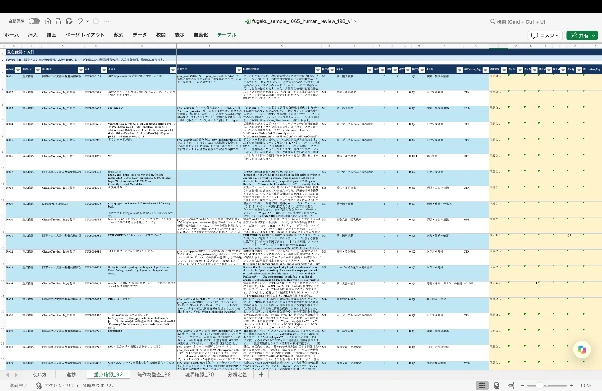
Tip 4: 人手による最終チェックを見据えたExcel出力
LLMによる分類は、どれほどプロンプトを精緻化しても完璧にはなりません。特に、カテゴリ境界に近いクエリや文脈が不足しているクエリについては、人間による最終確認(Human-in-the-Loop)が不可欠です。
LLM自身が迷ったケース(review_flagが付与された行)や、特定の条件を満たす行(例:副フラグが複数付与された行、特定の四半期のデータ)を人間が集中的かつ効率的にレビューできるよう、最終的な成果物は視認性の高いExcelファイルとして出力される設計がなされました。
出力されるExcelファイル(fugaku_sample_1065_detail_v1.xlsx)は、長文のクエリや回答が読みやすいようにセル幅を調整し、先頭行を固定しています。さらに、クエリの先頭が「=」や「-」で始まる場合に表計算ソフトが数式と誤認し、数式インジェクション(意図しない数式の実行)や表示エラーを引き起こすことを防ぐため、エスケープ処理を施しています。人間の担当者はこの一覧に基づいて不確実な分類結果を確認し、修正内容をcorrections.tsvへ追記して全体集計を確定します。
7. 実際の分析結果の一部:「富岳サポートサイト」と「スパコン成果ナビ」の比較
これらのプロセスを経て出力された最終的な集計結果のデータは、2つのプラットフォームの性質の違いを鮮明に浮き彫りにしています。
以下は、「富岳サポートサイト」 (母集団からの層化標本1,065件の重み付き推定)と、「スパコン成果ナビ」(期間内全1,065件の実測値)の目的軸(Q軸)および機構軸 (M主コード)の構成比を比較したものです。このデータから、両者のユースケースが決定的に異なることが読み取れます。
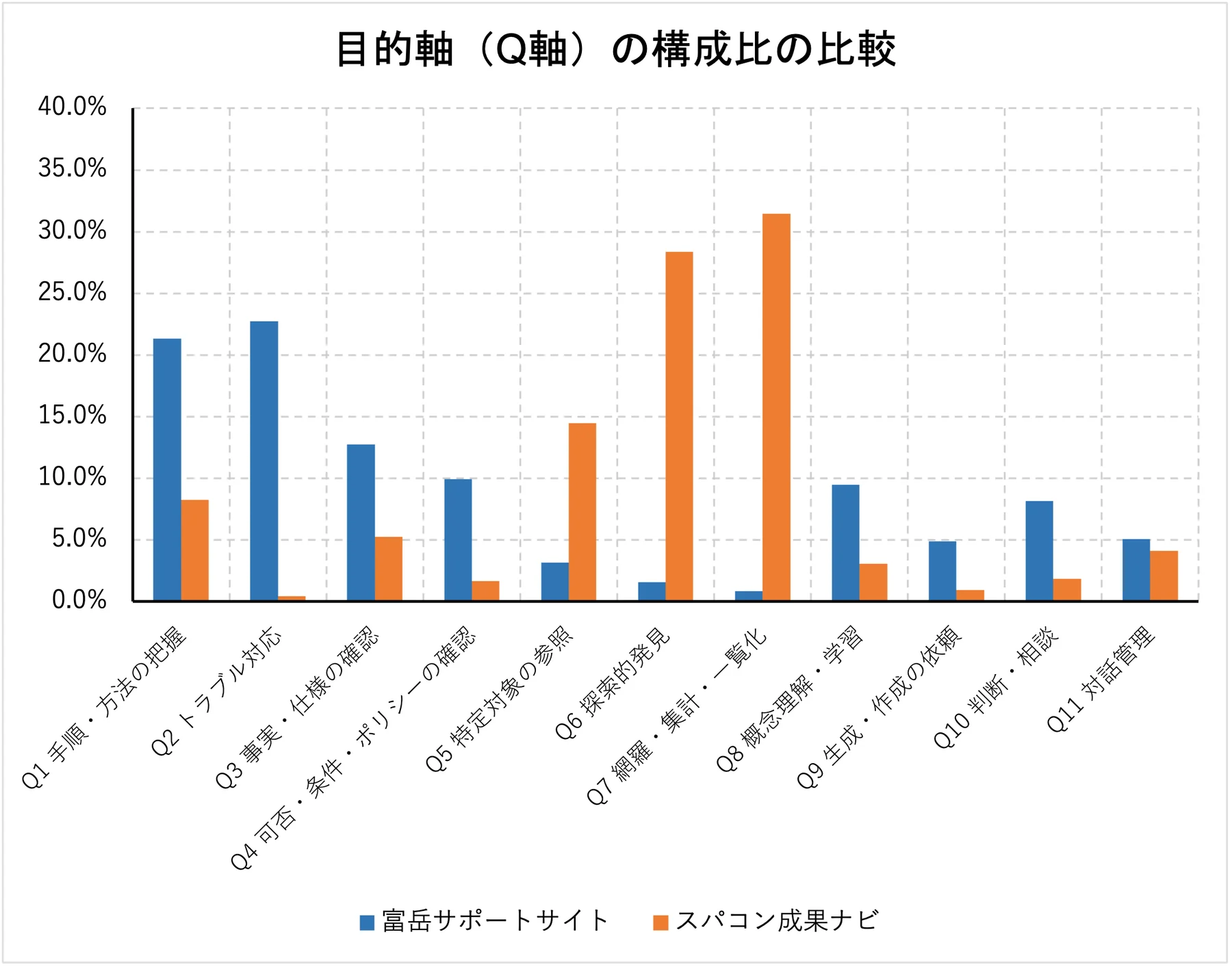
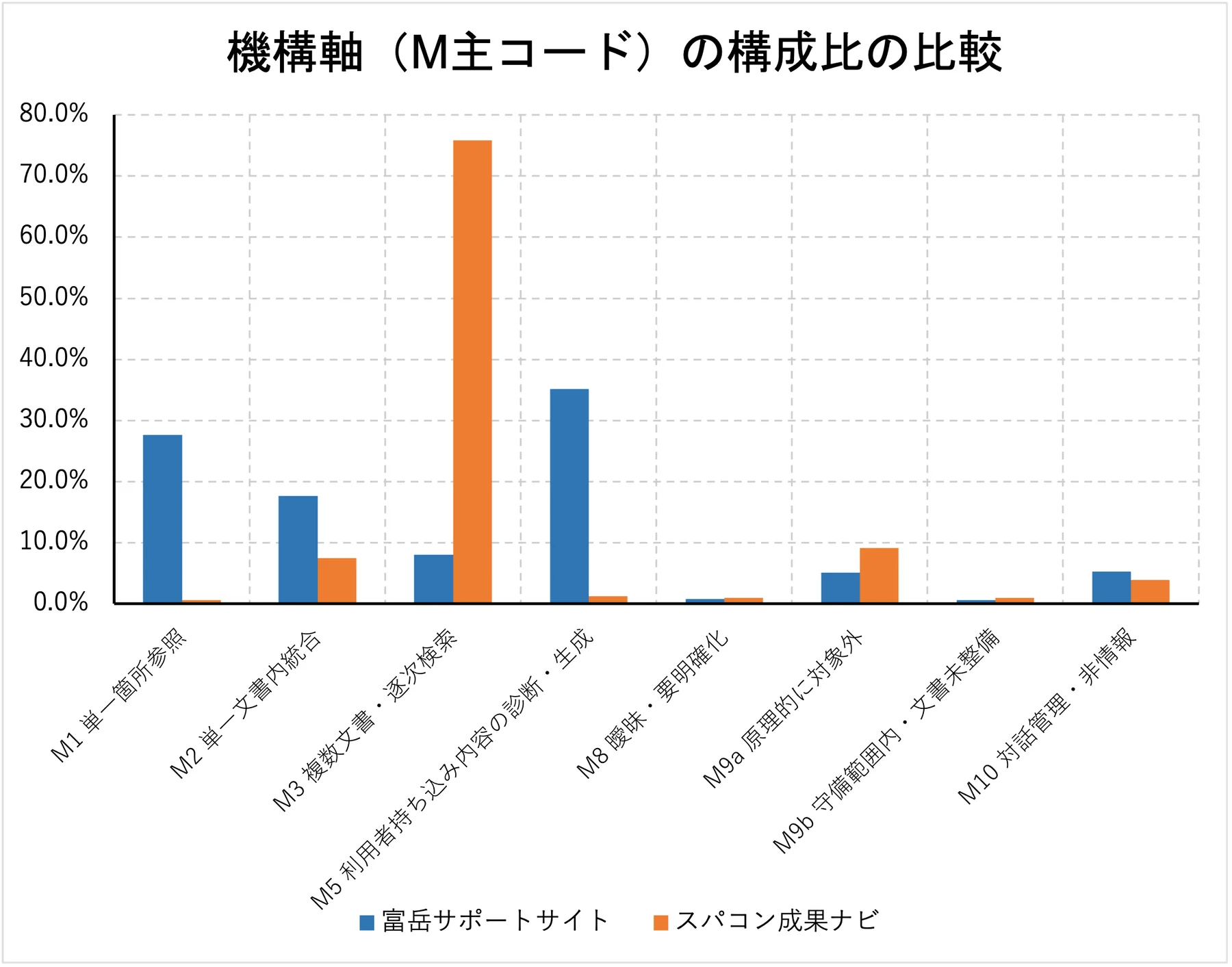
「富岳サポートサイト」では、「トラブル対応 (Q2:22.7%)」や「手順の把握 (Q1:21.3%)」が圧倒的に多く、機構的にも「利用者持ち込み内容の診断(M5:35.1%)」や「単一箇所参照(M1:27.6%)」が大半を占めています。これは、ユーザーが実際にシステムを利用する中で発生した具体的なエラーの解決や、特定のコマンドの実行方法を求める、極めて実務的で個別具体的な技術サポートとしての利用実態を示しています。
対照的に、「スパコン成果ナビ」では「網羅・集計・一覧化(Q7:31.5%)」や「探索的発見(Q6:28.4%)」が上位を占め、機構的にも「複数文書・逐次検索(M3:75.9%)」が突出しています。これは、同プラットフォームが過去の研究成果や論文を横断的に検索し、特定の技術領域や企業に関連するトレンドをマクロな視点で調査するための、リサーチおよびディスカバリーツールとして機能していることを明確に裏付けています。
こうしたクエリ分析の詳細は、レポート本文の2章(「理化学研究所スーパーコンピュータ「富岳」ユーザーサポートにおける生成AI活用 - AskDonaの24か月運用実績とクエリ分析」)をご参照ください。
8. まとめ
本稿で紹介したように、LLMを用いたクエリ分類は、LLMへプロンプトを送るだけで完了するものではありません。実務で数千件から数万件のデータを一貫して分類するには、分類基準の明確化、AIとプログラムの役割分担、大量処理を支える管理設計、人間の確認を組み込んだワークフローが必要です。
「富岳サポートサイト」と「スパコン成果ナビ」の分析事例が示すように、カテゴリ境界の曖昧さ、クラス間の混同、文脈不足、特定カテゴリへの偏りをシステム全体で管理し、分類過程を追跡できるようにすることが重要です。LLMの文脈理解、プログラムによる確実な処理、人間の専門知識を組み合わせることで、大規模なデータでも利用可能な分類体制を構築できます。
引用文献
- S. Parikh, M. Tiwari, P. Tumbade, and Q. Vohra, "Exploring Zero and Few-shot Techniques for Intent Classification," Proceedings of the 61st Annual Meeting of the Association for Computational Linguistics: Industry Track, 2023. https://aclanthology.org/2023.acl-industry.71/
- T. Hong et al., "Exploring the Use of Natural Language Descriptions of Intents for Large Language Models in Zero-shot Intent Classification," Proceedings of the 25th Annual Meeting of the Special Interest Group on Discourse and Dialogue, 2024. https://aclanthology.org/2024.sigdial-1.39/
- P. Mirza, V. Sudhi, S. R. Sahoo, and S. R. Bhat, "ILLUMINER: Instruction-tuned Large Language Models as Few-shot Intent Classifier and Slot Filler," Proceedings of LREC-COLING 2024, 2024. https://aclanthology.org/2024.lrec-main.758/
- J. Shin et al., "Learning to Adapt Large Language Models to One-Shot In-Context Intent Classification on Unseen Domains," CustomNLP4U, 2024. https://aclanthology.org/2024.customnlp4u-1.15/
- H.-C. Kuo and Y.-N. Chen, "Zero-Shot Prompting for Implicit Intent Prediction and Recommendation with Commonsense Reasoning," Findings of ACL, 2023. https://aclanthology.org/2023.findings-acl.17/
- X. Song et al., "Large Language Models Meet Open-World Intent Discovery and Recognition: An Evaluation of ChatGPT," EMNLP, 2023. https://aclanthology.org/2023.emnlp-main.636/
参考
procedure_v3.0.md(LLM向けの作業手順書)
# Claude Cowork向け クエリ4軸分類・比較分析 作業手順書

文書バージョン: 3.0
分類体系バージョン: 2.0(変更なし)
作成日: 2026-08-17
対象: 富岳サポートサイトの層化無作為標本1,065件、スパコン成果ナビの2026-06-30までの1,065件
主な読者: Claude Cowork、および作業内容を確認するGFLOPSチームメンバー

## 0. この文書の使い方

Claude Coworkは、作業開始前にこの文書を最後まで読むこと。新しいセッションでも、過去の会話だけを根拠にせず、本手順書、manifest、progress、decision logを読み直すこと。

本書は作業手順書v2.0を、富岳12,285件の全件判定から、再現可能な層化無作為標本1,065件の判定へ切り替えた版である。分類体系、優先順位、校正済みの判定プロンプト、K軸、C軸、ティアの規則は変更しない。

判定結果をチャット内だけに保持してはならない。100件の判定が終わるたびにファイルへ保存し、セッション上限に達しても完了済みバッチを再判定せず再開できる状態を保つ。

### 0.1 v3.0で変わったこと

| 項目 | v2.0 | v3.0 |
| --- | --- | --- |
| 富岳のLLM本番判定対象 | userメッセージ全12,285件 | 四半期×DBで層化した1,065件 |
| 富岳のバッチ | 123バッチ | 原則11バッチ(100件×10、65件×1) |
| 抽出法 | なし | 比例配分+固定SHA-256順位 |
| 進捗 | progress_fugaku.json | progress_fugaku_sample_1065.jsonを新設 |
| 成果ナビの比較範囲 | 2026-08-10まで1,165件、主集計は自発926件 | 2026-06-30まで1,065件を比較の基準に固定 |
| 富岳の期間全体推定 | 実測値 | 標本重みを用いた推定値 |
| 四半期分析 | 全件 | 探索的分析。各四半期の標本数と不確実性を必ず併記 |

### 0.2 変更しないもの

- taxonomy version 2.0
- judge_prompt_v2.5.md
- gold_set_v3.tsv
- session_anchors_fugaku.tsv
- k_axis_rules_v1.json
- M軸、Q軸、K軸、C軸、ティアの定義
- 成果ナビの完了済みラベル

### 0.3 情報の優先順位

資料間で記述が異なる場合は、次の順で採用する。

1. 本手順書v3.0
2. 00_governance/decision_log_fugaku.mdの校正round5確定事項
3. judge_prompt_v2.5.md
4. taxonomy_v2.0.json、k_axis_rules_v1.json
5. 人が承認したgold_set_v3.tsv
6. 作業手順書v2.0、構成案、旧Excel

v2.0の「富岳全12,285件を判定する」「123バッチを処理する」という記述は、v3.0では採用しない。

### 0.4 ファイル操作の安全ルール

- 元JSON、既存の正規化JSONL、成果ナビの完了済みファイル、校正ファイルは参照専用とする。
- 既存の03_batches/fugaku、04_labels/fugaku、progress_fugaku.jsonを削除、上書き、流用しない。
- 標本専用のファイル名とサブディレクトリを使う。
- 大容量JSONを画面へ全文表示しない。Pythonでストリーミング処理する。
- 00_governanceの既存ファイルは上書きしない。新規追加とdecision logへの追記だけを行う。
- 元データと中間成果物を、最終成果物の検証完了前に削除しない。

## 1. 目的と分析設計

### 1.1 目的

1. 富岳サポートサイトとスパコン成果ナビのクエリを同一の4軸で比較する。
2. 富岳側のLLM判定を1,065件へ抑えつつ、24か月と日本語DB・英語DBの構成を母集団に近い形で保つ。
3. 抽出、判定、重み付け、集計を再現できる記録を残す。

### 1.2 比較対象

#### スパコン成果ナビ

- 比較範囲: 2025-08-25から2026-06-30まで(JST)
- userメッセージ: 1,065件
- この1,065件は標本ではなく、期間内の全userメッセージである。
- 既存のhpci_master_labeled.jsonlから日付で切り出す。再判定しない。
- 2026-07-01から2026-08-10までの100件は比較対象から外すが、既存成果物から削除しない。
- 1,065件のうちスターターは238件、自発クエリは827件である。機械集計で再確認する。

#### 富岳サポートサイト

- 母集団: 2024-07-03から2026-06-30までのuserメッセージ12,285件
- 母集団ファイル: 02_normalized/fugaku_normalized.jsonl
- 本番LLM判定対象: 層化無作為抽出した1,065件
- 抽出層: quarter × db_or_language の16層
- 抽出法: 各層へ比例配分し、固定SHA-256順位で抽出
- 富岳の公式スターター一覧が未確定のため、starter_flagは現状の0を保持する。

### 1.3 なぜ1,065件か

スパコン成果ナビの開始日から2026-06-30までのuserメッセージが1,065件である。富岳も同数を判定し、LLM判定量を抑えながら分類構成を比較する。

同じ件数でも、成果ナビは期間内全件、富岳は標本である。総件数を直接比較して利用量の差を論じてはならない。比較の中心は構成比とする。

### 1.4 分析単位

- 主分析: 富岳24か月母集団に対する重み付き分類構成比と、成果ナビ1,065件の実測構成比
- 補足分析: 富岳標本1,065件の生の件数と無加重構成比
- 時系列: 富岳の四半期別構成比。標本数が少ない四半期は探索的結果として扱う。
- 引用比較: 両サイトで引用機能が安定した2025-10-01から2026-06-30まで。回答欠損は分母から除外する。

## 2. 富岳1,065件の層化無作為抽出

### 2.1 抽出前の固定確認

次を確認し、値が異なる場合は抽出を開始せず報告する。

| 項目 | 固定値 |
| --- | --- |
| dataset_version | fugaku_202407_202606_v1 |
| 母集団件数 | 12,285 |
| fugaku_normalized.jsonl SHA-256 | b35233c3c8ef6058187036478496b10e207120d77ba623b36dda76062f536051 |
| input_manifest_fugaku.json SHA-256 | 2211dba908cd9174c347935d7c5328dc0bda1fc607c32b05df0e9f812a9323b6 |
| judge_prompt_v2.5.md SHA-256 | 72a36ec451b053fe89ebc003030ad12db45c397903d0e0334035d32da420c3f5 |
| gold_set_v3.tsv SHA-256 | 4c2e70d71ced67d47f3887866b09a8aa835286a9d0b3ed81af1faa3a037300c5 |
| session_anchors_fugaku.tsv SHA-256 | 08e65a9bf9efc3c03819d9fcb57bb694ddefd77af1cb23b737fdfb0922f02485 |

### 2.2 層と配分

層はquarterとdb_or_languageの組み合わせとする。配分はHamilton法(最大剰余法)で、n_h = 1065 × N_h / 12285 を計算し、整数部を割り当てた後、残数を小数部の大きい層から配る。同率の場合はquarter、db_or_languageの昇順で決める。

確定配分は次のとおりである。

| 四半期 | DB | 母集団 N_h | 標本 n_h |
| --- | --- | ---: | ---: |
| 2024Q3 | 日本語DB | 1,504 | 130 |
| 2024Q3 | 英語DB | 173 | 15 |
| 2024Q4 | 日本語DB | 1,667 | 145 |
| 2024Q4 | 英語DB | 181 | 16 |
| 2025Q1 | 日本語DB | 1,595 | 138 |
| 2025Q1 | 英語DB | 297 | 26 |
| 2025Q2 | 日本語DB | 1,347 | 117 |
| 2025Q2 | 英語DB | 131 | 11 |
| 2025Q3 | 日本語DB | 1,346 | 117 |
| 2025Q3 | 英語DB | 148 | 13 |
| 2025Q4 | 日本語DB | 692 | 60 |
| 2025Q4 | 英語DB | 46 | 4 |
| 2026Q1 | 日本語DB | 969 | 84 |
| 2026Q1 | 英語DB | 63 | 5 |
| 2026Q2 | 日本語DB | 1,828 | 158 |
| 2026Q2 | 英語DB | 298 | 26 |
| 合計 |  | 12,285 | 1,065 |

四半期別の標本数は、2024Q3 145件、2024Q4 161件、2025Q1 164件、2025Q2 128件、2025Q3 130件、2025Q4 64件、2026Q1 89件、2026Q2 184件である。

### 2.3 固定抽出方法

擬似乱数ライブラリの実装差を避けるため、固定ハッシュ順位を使う。

1. 文字列シードを fugaku1065_v3_20260817 とする。
2. 各行について、seed、dataset_version、uidをタブで連結する。
3. 連結文字列のUTF-8バイト列へSHA-256を適用し、16進文字列をselection_hashとする。
4. 各層内でselection_hash、uidの順に昇順ソートする。
5. 各層の先頭n_h件を選ぶ。
6. 選択後はdatetime_jst、uidの順に並べ、バッチへ分割する。

この方法では同じ母集団と同じシードから常に同じ1,065件が得られる。別の標本を作る場合は、既存ファイルを上書きせずsampling versionとseedを変更する。

### 2.4 標本ファイルの必須項目

02_normalized/fugaku_sample_1065.jsonlを新規作成し、元の正規化レコードに次を追加する。

- sampling_version: fugaku_stratified_1065_v1
- sample_flag: 1
- sample_stratum: 例 2024Q3__日本語DB
- stratum_population_n: N_h
- stratum_sample_n: n_h
- inclusion_probability: n_h / N_h
- sample_weight: N_h / n_h
- selection_seed: fugaku1065_v3_20260817
- selection_hash

標本uidを付け直さない。元のFUG-######を保持する。

### 2.5 標本manifest

01_manifest/sample_manifest_fugaku_1065.jsonを新規作成し、少なくとも次を記録する。

- sampling_version、作成日時、作成者
- 母集団ファイル名、件数、SHA-256
- 抽出コードのファイル名とSHA-256
- seedとハッシュ式
- 層別のN_h、n_h、抽出率、重み
- 選択されたuid一覧のSHA-256
- 標本JSONLの件数、期間、DB別・四半期別件数、SHA-256
- uid重複0、母集団外uid 0

### 2.6 抽出後の必須検証

- 標本が1,065件である。
- uidが1,065件すべて一意である。
- 全uidがfugaku_normalized.jsonlに存在する。
- 層別件数がSection 2.2の表と完全一致する。
- 同じスクリプトを再実行し、標本uid一覧のSHA-256が一致する。
- 標本作成で母集団JSONLを変更していない。

## 3. 分類体系

分類体系はversion 2.0のまま固定する。

### 3.1 機構軸M

主コードを1つ付与する。

| コード | 名称 | 要点 |
| --- | --- | --- |
| M1 | 単一箇所参照 | 1回の検索、1文書内の連続した1箇所で完結 |
| M2 | 単一文書内統合 | 1つのトピックまたは文書の複数箇所を統合 |
| M3 | 複数文書・逐次検索 | 複数文書・課題・領域を横断、または再検索 |
| M5 | 利用者持ち込み内容の診断・生成 | 貼り付けログ、コード、数値等の個別分析・生成 |
| M8 | 曖昧・要明確化 | 文脈を含めても対象や意図が決まらない |
| M9a | 原理的に対象外 | 個別状態、リアルタイム情報、一般知識等 |
| M9b | 守備範囲内・文書未整備 | 守備範囲内だが必要文書がない証拠がある |
| M10 | 対話管理・非情報 | 挨拶、有人対応要求、不満、修正指示等 |

優先順位:

M10 > M9a > M9b > M8 > M3 > M5 > M2 > M1

副フラグは独立に0または1を付ける。

- M4 網羅・集約: 全件、件数、合計、順位、一覧、表、集合抽出
- M6 否定・除外: 以外、除く、使わない等
- M7 時系列・鮮度: 年度、期間、最新、変更時期、版差分等

ティアはLLMに判定させず機械計算する。

- M1はT1。ただしM4、M6、M7のどれかが1ならT2。
- M2、M3はT2。
- M5、M8、M9a、M9b、M10はT3。

### 3.2 M9bの証拠ルール

LLM判定入力には回答本文を含めないため、クエリだけからM9bを推測しない。証拠不足なら最も近いM1、M2、M3等を付け、review_flagへM9Bを入れる。

マージ後、answer_head_600に「見つかりませんでした」「見当たりません」「記載がありません」等がある行を機械抽出し、人がM9bを確定する。元LLMラベルは保持し、修正はcorrections.tsvへ記録する。

### 3.3 目的軸Q

1クエリに必ず1つ付与する。

| コード | 名称 |
| --- | --- |
| Q1 | 手順・方法の把握 |
| Q2 | トラブル対応 |
| Q3 | 事実・仕様の確認 |
| Q4 | 可否・条件・ポリシーの確認 |
| Q5 | 特定対象の参照 |
| Q6 | 探索的発見 |
| Q7 | 網羅・集計・一覧化 |
| Q8 | 概念理解・学習 |
| Q9 | 生成・作成の依頼 |
| Q10 | 判断・相談 |
| Q11 | 対話管理 |

優先順位:

Q11 > Q2 > Q9 > Q7 > Q6 > Q5 > Q10 > Q4 > Q1 > Q8 > Q3

詳細な境界ルールはjudge_prompt_v2.5.mdを正本とする。特にQ3/Q8、Q2/Q9、Q1/Q3、Q4/Q3、Q4/Q10、Q5/Q6、Q6/Q7、Q11を丁寧に適用する。

### 3.4 K軸、K理論値、C軸

- K軸はk_axis_rules_v1.jsonで機械判定する。判定順序はK4 > K2 > K1 > K3。
- K理論値はQ1・Q9→K1、Q2→K2、Q3・Q4・Q5・Q6・Q7・Q8→K3、Q10・Q11→K4。
- C軸は参照文書数0→C0、1〜2→C1、3〜4→C2、5以上→C3。
- 回答欠損はC軸の分母から除外する。
- C軸のサイト比較は2025-10から2026-06に限定する。

## 4. 校正済み判定ゲート

富岳の校正round5は完了し、本番判定ゲートは解除済みである。

| 対象 | M一致率 | Q一致率 |
| --- | ---: | ---: |
| 富岳216件 | 90.7% | 90.3% |
| 全体369件 | 92.1% | 93.2% |

Shiori確定の要判断9件は9件ともM2。副フラグの偏りなし。富岳側の証拠なしM9b付与は0件である。

校正をやり直さない。judge_prompt_v2.5.mdとgold_set_v3.tsvを変更しない。

## 5. フォルダとファイル

既存の全件用ファイルを残し、標本専用ファイルを追加する。

    query_classification_v2/
    ├── 00_governance/
    │   ├── judge_prompt_v2.5.md
    │   ├── gold_set_v3.tsv
    │   ├── session_anchors_fugaku.tsv
    │   ├── sampling_plan_fugaku_1065_v1.json
    │   └── next_session_prompt_production_sample1065.md
    ├── 01_manifest/
    │   ├── input_manifest_fugaku.json
    │   ├── sample_manifest_fugaku_1065.json
    │   └── progress_fugaku_sample_1065.json
    ├── 02_normalized/
    │   ├── fugaku_normalized.jsonl
    │   └── fugaku_sample_1065.jsonl
    ├── 03_batches/
    │   ├── fugaku/                       既存123バッチ。変更しない
    │   └── fugaku_sample_1065/
    ├── 04_labels/
    │   ├── fugaku/                       既存全件用。変更しない
    │   └── fugaku_sample_1065/
    ├── 05_merged/
    │   ├── hpci_master_labeled.jsonl
    │   ├── hpci_to_20260630_labeled.jsonl
    │   └── fugaku_sample_1065_master_labeled.jsonl
    ├── 06_review/
    │   ├── sample1065/
    │   └── corrections_sample1065.tsv
    ├── 07_outputs/
    │   ├── query_comparison_to_20260630_sample1065_v1.xlsx
    │   └── fugaku_sample_1065_detail_v1.xlsx
    └── scripts/
        ├── sample_fugaku_1065.py
        ├── make_batches_fugaku_sample_1065.py
        ├── validate_labels_fugaku_sample_1065.py
        ├── merge_labels_fugaku_sample_1065.py
        └── build_summary_sample1065.py

既存スクリプトを直接上書きせず、標本用の新規スクリプトを作るか、入力・出力先を引数化した新版を新規作成する。

## 6. バッチ生成

### 6.1 基本単位

- 本番100件を1バッチとする。
- 各バッチ先頭へ富岳用アンカー20件を追加する。
- 1,065件なら原則11バッチ。B0001〜B0010は本番100件、B0011は本番65件。
- アンカーは集計から除外する。

### 6.2 バッチ形式

UTF-8、タブ区切り、ヘッダあり。

    uid    dataset    turn    query_for_judge    context_for_judge

datasetはfugaku_sample_1065とする。標本行の順序はdatetime_jst、uidの昇順で固定する。

### 6.3 バッチ検証

- 全バッチの本番行合計が1,065。
- 本番uidの重複0。
- 標本JSONLのuid集合と完全一致。
- バッチ内順序とbatch_index.jsonが一致。
- 各バッチ1MB以下。超える場合はそのバッチだけ分割し、manifestとprogressの総バッチ数を更新する。
- 既存の03_batches/fugakuを変更していない。

## 7. LLM-as-a-judge本番判定

### 7.1 固定プロンプト

00_governance/judge_prompt_v2.5.mdをそのまま使う。SHA-256がSection 2.1と一致しなければ停止する。

判定サブエージェントへ読ませてよいものは、次の3種類だけとする。

1. 本手順書のSection 3
2. judge_prompt_v2.5.md
3. 担当バッチTSV

gold set、過去の予測結果、decision log、アンカーの正解列は渡さない。

### 7.2 富岳用前提知識

各判定サブエージェントへ次を明示する。

すべて富岳サポートサイトのログである。コーパスは富岳の利用マニュアル、FAQ、運用のお知らせ。貼り付けログやコードの診断はM5。個人のアカウント状態・残容量・リアルタイム障害・一般的なLinuxや外部OSSの内部仕様・チャットボット自身の仕様はM9a。富岳の操作、ジョブ、コンパイラ、ストレージ等は守備範囲の中心である。

### 7.3 実行単位

- 同時サブエージェントは最大6本。
- 6バッチを第1組、残りを第2組として実行する。
- 1バッチごとに04_labels/fugaku_sample_1065/labels_B####.tsvへ直接保存する。
- チャット本文へ判定結果を貼り付けない。
- 出力はヘッダなし7列のみ。

    uid, m_main, m4, m6, m7, q_code, review_flag

### 7.4 バッチごとの必須検証

- 入出力行数一致
- uid集合・順序一致
- uid重複0
- M主コードとQコードが許可値のみ
- M4、M6、M7が0または1
- review_flagが許可値のみ
- 全行7列
- アンカーのM主コードとQコード一致率が95%以上

検証失敗時はそのバッチだけ修正する。正常な前バッチを再判定しない。

### 7.5 停止条件

- 同じバッチでvalidatorが3回失敗
- 再判定してもアンカー一致率95%未満が2回連続
- M9b付与率が3%を超える
- M/Q分布が校正結果や既知の富岳傾向から大きく外れる
- 標本以外のuidがラベルへ混入

停止時も正常なバッチをprogressへ記録し、次回は未処理バッチだけを再開する。

## 8. progressと再開

01_manifest/progress_fugaku_sample_1065.jsonを新規作成する。既存のprogress_fugaku.jsonを転用しない。

必須項目:

    dataset_version
    sampling_version
    taxonomy_version
    prompt_file
    prompt_sha256
    sample_manifest_sha256
    sample_jsonl_sha256
    total_sample_rows
    total_batches
    completed_batches
    failed_batches
    next_batch
    batch_anchor_agreement
    last_updated_jst

1組が終わるたびにprogressを更新する。

再開時:

1. 本手順書を読む。
2. sample manifestとprogressを読む。
3. 04_labels/fugaku_sample_1065の実ファイルとcompleted_batchesを照合する。
4. 正常ファイルをvalidatorで再確認するが再判定しない。
5. next_batchから続ける。

## 9. マージと機械判定

標本JSONLと標本ラベルだけを結合し、fugaku_sample_1065_master_labeled.jsonlを作る。

各行へ次を保持・追加する。

- 元の抽出情報とsample_weight
- LLMの元ラベル
- corrections適用後の最終ラベル
- M/Qカテゴリ名
- ティア
- Kコード、K理論値、K一致
- Cコード
- label_batch、prompt version、taxonomy version、sampling version
- review_status

アンカー行を除外する。masterは必ず1,065件とする。

成果ナビはhpci_master_labeled.jsonlからJST日付が2026-06-30までの行を抽出し、hpci_to_20260630_labeled.jsonlを作る。既存masterを変更しない。抽出後は1,065件、スターター238件、自発827件を機械確認する。

## 10. 人による品質確認

標本全体を1ブロックとして、次をレビューする。

- 固定シードによる無作為抽出100件
- review_flag付き全件
- M9B候補全件
- LLMがM9bを付けた全件
- M4、M6、M7が2つ以上付いた全件
- 校正round4・5で恒常的だったQ境界と同型の行
- 各四半期から最低10件。ただし上の集合と重複可
- 日本語DBと英語DBの両方

修正は元ラベルTSVへ直接入れず、06_review/corrections_sample1065.tsvへ追記する。

修正率が10%を超える、または同じ誤りが特定境界に3件以上連続する場合は、全体集計を確定せず原因を確認する。分類定義を変える必要がある場合はtaxonomy versionを上げ、影響範囲を再判定する。

## 11. 重み付き集計

### 11.1 富岳の期間全体構成比

層hの母集団件数をN_h、標本件数をn_h、カテゴリ該当をy_hiとする。富岳母集団のカテゴリ構成比推定値は次で計算する。

    P_hat = sum_h [N_h × (sum_i y_hi / n_h)] / 12,285

同じことを個票のsample_weight = N_h / n_hで計算してよい。

主表には次を併記する。

- 標本の生件数(分母1,065)
- 重み付き構成比
- 推定母集団件数(12,285 × 重み付き構成比。推定値と明記)
- 標準誤差または95%信頼区間

丸め前の値で計算し、表示時だけ丸める。重み付き推定件数のカテゴリ合計は丸めにより12,285と数件ずれる場合があるため、構成比を正本とする。

### 11.2 成果ナビ

成果ナビ1,065件は期間内全件なので、通常の件数と構成比を使う。標本誤差の信頼区間は付けない。

主比較は全1,065件同士で示す。成果ナビについてはスターターを除いた827件の構成比も感度分析として併記する。富岳の公式スターターが未確定であることを注記する。

### 11.3 四半期分析の注意

比例配分により四半期別標本数は64〜184件である。四半期別の95%誤差幅は、比率50%付近の単純近似で約±7〜12ポイントになる。数ポイントの増減を意味のある変化として解釈しない。

特に2025Q4は64件、英語DBは4件である。英語DBの四半期別構成比を単独で論じない。DB別分析は期間全体を基本とする。

### 11.4 比較上の注意

- 同じ1,065件でも、成果ナビは全数、富岳は標本である。
- 対象期間が異なる。富岳は24か月、成果ナビは約10か月である。
- 総件数や1か月平均を、同じ標本数を根拠に比較しない。
- 構成比差は、富岳の重み付き構成比 minus 成果ナビ実測構成比で示す。
- 「用途と分類構成が関連している」と述べ、因果を断定しない。
- M9aとM9bを分け、誘導改善と文書追加を混同しない。

## 12. Excel成果物

### 12.1 比較集計

07_outputs/query_comparison_to_20260630_sample1065_v1.xlsxを新規作成する。

推奨シート:

1. サマリー
2. 分類定義
3. 抽出設計
4. 富岳集計(生件数・重み付き構成比・信頼区間)
5. 成果ナビ集計(1,065件、スターター除外827件も併記)
6. 2サイト比較
7. 四半期
8. DB・言語
9. 引用比較
10. 品質確認
11. ファイル索引

既存のquery_comparison_summary_v1.xlsxを上書きしない。

### 12.2 富岳標本明細

07_outputs/fugaku_sample_1065_detail_v1.xlsxを作る。1,065件なので1ファイルでよい。

既存33列に加え、次を入れる。

- sampling_version
- sample_stratum
- stratum_population_n
- stratum_sample_n
- inclusion_probability
- sample_weight
- selection_hash

クエリは最大2,000文字、回答は冒頭600文字。長文セルは折り返さず、先頭行固定とフィルターを設定する。数式注入を防ぐ。

### 12.3 必須検証

- 富岳明細1,065件
- 成果ナビ比較集合1,065件
- 富岳の層別件数がSection 2.2と一致
- M主コードとQコードの合計が各1,065
- 重み合計が約12,285
- 重み付き構成比の各軸合計が100%
- 数式エラー0
- 集計値がmaster JSONLからの再集計と一致
- 既存Excelを上書きしていない

## 13. 最終成果物と完了条件

次が揃った時点で完了とする。

1. 抽出スクリプトとsampling plan
2. sample manifest
3. 富岳標本JSONL 1,065件
4. 標本バッチとbatch index
5. 全バッチの検証済みラベル
6. 全バッチのアンカー一致率95%以上
7. 標本master JSONL 1,065件
8. 成果ナビ2026-06-30までの比較用JSONL 1,065件
9. 人レビューとcorrections
10. 比較集計Excelと富岳標本明細Excel
11. decision_log_fugaku.mdへの抽出設計・実行結果の追記
12. 新しいセッションがmanifestとprogressから再開できる状態

## 14. Claude Coworkへの開始指示

本番判定の開始には、00_governance/next_session_prompt_production_sample1065.mdを使う。

1セッションで抽出、バッチ生成、11バッチの判定までを目標とする。ただし、マージとExcel生成は別セッションへ分ける。利用上限が近い場合は、正常なラベルとprogressを保存して停止し、未処理バッチだけ次回へ回す。

## 15. 参照資料

| 資料 | 位置づけ |
| --- | --- |
| 作業手順書v2.0 | 全件処理版。分類定義と技術上の注意の参照 |
| next_session_prompt_round5.md | 校正round5の指示形式の参考 |
| next_session_prompt_production_s1.md | 全件版の本番指示。v3.0ではバッチ範囲を流用しない |
| decision_log_fugaku.md | 校正round5までの確定事項 |
| calibration_summary_fugaku_round5.json | 本番ゲート解除の根拠 |
| query_comparison_summary_v1.xlsx | 成果ナビ既存集計。比較範囲はv3.0で2026-06-30までに切り直す |
| hpci_detail_00001_01165_v1.xlsx | 成果ナビ明細。既存1,165件を削除せず日付で比較集合を作る |

## 16. 変更管理

抽出層、配分、seed、ハッシュ式、比較期間、starter allowlist、分類定義、判定プロンプトを変更した場合は、decision_log_fugaku.mdへ変更前後、理由、影響範囲、再抽出・再判定の要否を記録する。

seedまたは抽出法を変えた場合はsampling versionを上げる。分類定義を変えた場合はtaxonomy versionを上げる。既存標本や既存ラベルへ上書きしない。

本改訂は分析対象と抽出設計の変更であり、分類体系は変更していない。taxonomy versionは2.0のままとする。
judge_prompt_v2.5.md(LLMによる判定プロンプト)
あなたはAskDonaクエリ分類の判定者です。
procedure_v2.0.mdのSection 3を正本として、入力された各クエリを独立に判定してください。

付与する項目:
1. M主コードを1つ: M1, M2, M3, M5, M8, M9a, M9b, M10
2. M4フラグ: 0または1
3. M6フラグ: 0または1
4. M7フラグ: 0または1
5. Qコードを1つ: Q1からQ11
6. review_flag: 判断が不安定な場合だけ記入

M主コード優先順位:
M10 > M9a > M9b > M8 > M3 > M5 > M2 > M1

Qコード優先順位:
Q11 > Q2 > Q9 > Q7 > Q6 > Q5 > Q10 > Q4 > Q1 > Q8 > Q3

重要:
- M4、M6、M7は主コードではなく独立フラグです。該当するものをすべて1にしてください。
- Q11は非情報の対話管理だけです。範囲外の情報質問は本来のQ目的へ分類してください。
- M9bは証拠がある場合だけ付与してください。証拠不足なら最も近いMコードを付け、review_flagにM9Bと書いてください。
- 判定理由や説明文は出力しないでください。
- 入力順を変えないでください。

## 境界ルール(v2.5。分類定義そのものは変更していない)

M軸:
- M1とM2: 1つの値、定義、1コマンドの用法など1箇所で答えが完結するならM1。1つのコマンドやパラメータの指定で完結する操作方法もM1とする。複数の手順ステップ、前提条件、設定の組み合わせを1文書内から集めて構成する必要があるならM2。
- M3: 複数の文書、複数の課題、異なるマニュアル領域を横断する必要がある場合。
- M5とM9a: ユーザーが自分のログ、コード、コマンド出力、文章を貼り付けて診断や書き換えを求める場合はM5とし、M9aにはしない。貼りつけがなく、対象コーパスの守備範囲外の事実や手順を問う場合はM9a。
- M8とM10: 挨拶、御礼、有人対応要求、回答への不満、明確な修正指示はM10。直前文脈がないのに指示語や修正指示だけで意図が決まらない発話はM8とし、review_flagにCTXを書く。
- M9b: 回答や文脈から「守備範囲内なのに資料が存在しない」ことが確認できる場合だけ付与する。

M副フラグ:
- M4: M4はQコードと独立に判定する。件数、合計、順位、上位N件、一覧、表、全件、条件を満たす集合の抽出が必要な場合に1とする。複数の事例、課題、文書を集めて示す必要がある場合(「まとめて」「列挙」「抽出」「一覧」など)も1とする。複数の課題番号や識別子をまとめて照会する場合も1とする。1つの対象についての説明だけを求める場合、および推薦や判断を求めるだけで集合の網羅が不要な場合(「2名推薦してください」など)は0とする。
- M6: 「以外」「除く」「使わない」「該当しない」など、除外演算が必要な場合。
- M7: 年度や期間での絞り込み、推移、最新、変更時期、版差分、継続年数など、時点の管理や時系列の推論が必要な場合。抽出項目の一覧に「実施年度」のような項目名が含まれるだけで、時点による絞り込みや推移の把握を求めていない場合はM7=0とする。

Q軸:
- Q5とQ6: 課題番号、人名、組織名、製品名、ソフトウェア名、文書名を名指しして、その対象に到達したい場合はQ5。「どこにあるか」という所在を問うものもQ5。分野やテーマから、まだ特定していない事例や研究を探す場合はQ6。
- Q6とQ7: 件数、一覧、表、全件、上位N件、順位を明示的に求めるものはQ7。年度、数値しきい値、識別子の接頭辞のように、対象を名指ししない構造的条件で集合を抽出させるものもQ7。分野やテーマからの探索は、「まとめて」という語があってもQ6のままとする。
- Q5とQ7: 企業名、機関名、人名、課題番号など特定の対象を名指しして、その対象の事例、成果、報告書を求める場合はQ5とする。件数、順位、一覧、表を明示的に求めている場合だけQ7へ移す。
- Q3: 他のどれにも当たらない純粋な事実確認だけに使う。

## v2.3で追加した境界ルール(技術サポート系ログ向けの補足。定義は変更していない)

M1とM2の切り分け:
- M1にする: 1つのコマンド、オプション、環境変数、パラメータの用法や値。1つの設定項目のデフォルト値と最大値。1つのエラーコード、終了コード、ステータス値の意味。1つの表や1つの節から読み取れる一覧(リソースグループ一覧、終了コード一覧など)。「どのコマンドで確認できるか」という単一コマンドの提示。複数の値を尋ねていても、1つの表または連続した1つの節で答えが足りるならM1のままとする。
- M2にする: 導入から設定、実行までの複数ステップを順に構成する必要がある場合。前提条件、手順、注意事項を組み合わせる必要がある場合。1つの機能について概要、制限、使用例など複数の節を集めて説明する必要がある場合。
- 迷った場合: 答えが1つの表または連続した1つの節で足りるならM1、複数の節を集める必要があるならM2とする。

M2とM3の切り分け:
- 1つの機能、1つのコマンド、1つの領域、1つのアプリの中で完結するならM2。
- 異なるマニュアル(利用手引書とコマンドリファレンス、アプリ個別ドキュメントなど)を横断する場合、2つ以上の対象を比較する場合、2つの異なる技術を組み合わせる場合はM3。「AとBのどちらを使うべきか」「AとBの違い」はM3。

M5の範囲:
- 貼りつけがなくても、ユーザー自身の環境、実行結果、設定、計算条件を具体的に記述して、それに合わせた原因究明、修正、設定、コード、手順の作成を求める場合はM5とする。
- サンプルコードやスクリプトの作成、修正の依頼は、対象のソフトウェアが外部OSSであってもM5とする。M9aにはしない。

M9aの範囲(狭くとる):
- M9aにするのは次だけとする。個人のアカウント状態、残容量、割当や消費の実績値、申請件数などの運用統計、リアルタイムの障害状況、対象システムと無関係な一般知識や他社製品の内部仕様、チャットボット自身の仕様や使い方。
- 対象システム上で提供、導入されているソフトウェア(コンパイラ、MPI、Spack、各種アプリケーション、ジョブスケジューラなど)の利用方法、設定、制限は守備範囲内である。M9aにしない。

M8の範囲(狭くとる):
- 単語や短い語句だけのクエリでも、実在するコマンド名、機能名、領域名、制度名、技術用語であれば検索条件を作れるためM8にしない。
- M8とするのは、直前文脈を付けても対象が特定できない場合、および文が途中で切れていて要求が判別できない場合だけとする。このときreview_flagにCTXを書く。

Q2とQ3の切り分け:
- 実際に発生したエラーや警告の本文(rank、ノードID、パス、コマンド出力など具体的な事象を含む)を示して原因、意味、対処を尋ねる場合はQ2。
- エラーコードや終了コードの名前だけを挙げて意味を尋ねる場合(「PLM0026とは」「PC=23は?」)はQ3。
- 障害やエラーが発生していたかどうかを確認するだけの質問もQ3。

Q3とQ8の切り分け:
- 用語、概念、仕組み、理由、違いの理解を求める場合(「〜とは」「なぜ」「違いは」「どういう意味ですか」)はQ8。
- 値、仕様、所在などの事実を確認する場合はQ3。

Q1とQ3の切り分け:
- コマンド名、オプション名、設定値そのものを尋ねる場合はQ3。
- それを使って何かを行う手順、やり方を尋ねる場合はQ1。

Q4とQ3の切り分け:
- 「できますか」「してよいか」「制限はありますか」「条件は」など、可否、条件、ポリシーの確認はQ4。
- 「上限はいくつですか」「値は何ですか」のように数値や仕様そのものを尋ねる場合はQ3。

Q4とQ10の切り分け:
- 自分の理解や方針が正しいかの確認、推奨、選択、改善案を求める場合はQ10。
- 制度上、仕様上の可否だけを問う場合はQ4。

Q5とQ6の追加補足:
- 文書名、コマンド名、製品名、ソフトウェア名を名指しして、その対象そのものに到達したい場合、および問い合わせ先や所在を問う場合はQ5。
- テーマや目的から、まだ特定していない資料、ツール、事例を探す場合(「〜を説明した資料はありますか」「〜してくれるツールはありますか」)はQ6。

## v2.4で追加した境界ルール(校正round2の不一致が集中した箇所。定義は変更していない)

M1をとる範囲:
- 可否、権限、制限、ポリシーの確認で、答えが1つの規定や1つの条件で決まる場合はM1とする。例:「副代表者が代わりに実行できるか」「自分のフォルダにインストールできるか」「このコマンドで縮小した場合にデータは消えるか」「このツールは富岳で使えるか」。
- 1つのコマンド、1つのオプション、1つの指定方法を名指しして、その用法や記法を尋ねる質問は、答えに複数の記法例や複数の指定パターンが含まれる場合でもM1のままとする。
- 1つの制度、1つの利用区分、1つの領域について、その名称を挙げて定義や説明を求める質問(「低優先度利用」「2ndfs領域とは」など)はM1とする。

(注: v2.4にあった「M2にするのは複数ステップを順に組み立てる場合または前提条件と手順と注意事項を組み合わせる場合に限る」という限定は、v2.5で下記のとおり改めた。この限定はM1へ寄りすぎる原因になっていた。)

M3を必ずとる場合:
- 「どの資料に書かれているか」「〜を説明した資料はあるか」「〜の実績や事例はあるか」のように、対象の文書や事例が特定されておらず、複数の文書を横断して探す必要がある質問はM3とする。名指しの文書へ到達したいだけの質問(Q5)でも、どの文書かを探す必要があるならM3である。
- 2つの異なるシステム、2つの異なる技術、2つの異なる領域をまたぐ質問(例: 富岳とHPCI共用ディスク、コンパイラとアプリ固有の設定)はM3とする。

M5をとらない場合:
- 一般的な可否や一般的な手順を尋ねるだけで、ユーザー固有の状態、条件、成果物を示していない場合はM5にしない。
- 逆に、具体的なエラー本文、コマンド出力、スクリプト、自分の実行条件を示している場合は、それが公式ドキュメントに載っている内容であってもM5とする。

M9aをとる範囲(さらに明確化):
- M9aとするのは次に限る。個人のアカウント状態、残容量、過去の割当や消費の実績、申請件数などの運用統計、リアルタイムの障害状況、プログラミング言語そのものの文法や標準ライブラリの使い方、一般的なLinuxコマンドやシェルの一般知識、外部製品の最新版など対象コーパスの外にある最新情報、チャットボット自身の仕様や使い方。
- 対象システム上で提供、導入されているソフトウェア(コンパイラ、MPI、Spack、ジョブスケジューラ、各種アプリケーション)の導入、設定、実行、削除の方法は守備範囲内であり、M9aにしない。

Q1とQ3の切り分け(v2.3から調整):
- 目的を達成する手段を尋ねる場合はQ1とする。「〜する方法は」「〜するにはどうするか」だけでなく、「〜を確認するコマンドを教えて」「〜するためのオプションは」のように、手段としてのコマンド名やオプション名を尋ねる場合もQ1に含める。
- Q3とするのは、コマンドやオプションそのものの仕様、引数、設定値、出力項目の意味を尋ねる場合、および値や事実そのものを尋ねる場合とする。

## v2.5で追加した境界ルール(校正round3の不一致がM2とM1の境界へ集中したため。定義は変更していない)

v2.4はM1の範囲を広げすぎており、本来M2(1つのトピックについて複数箇所を集めて説明する必要がある)である質問をM1へ寄せていた。M1とM2の判定は、**答えが1箇所で完結するか、同じ文書やトピックの中で複数箇所を集める必要があるか**だけで決める。次の型は必ずM2とする。

M2を必ずとる場合(v2.5で追加):

1. **複数のオプションや設定を組み合わせて指定する場合**
   2つ以上のコンパイルオプション、環境変数、ジョブスクリプト指示文、設定項目を同時に有効にする、または組み合わせて指定する書き方を尋ねる質問はM2とする。個々のオプションの意味が別々の箇所に書かれており、それらを集めて1つの指定へ構成する必要があるためである。
   例:「最適化レベルとOpenMPと出力オプションを共に有効にした場合のコンパイルオプションの書き方」。

2. **2段階以上の作業になる場合**
   目的を達成するために、作成と実行、記述と投入、設定と確認のように2つ以上の作業段階を順に行う必要がある手順はM2とする。ジョブスクリプトの作成とジョブの投入がセットになる質問はここに当たる。
   例:「ジョブをバックグラウンドで実行する方法」「ログインノードの処理を切断後も継続させたい」。

3. **1つの機能やテーマについて複数の制限事項・注意事項を集める必要がある場合**
   「制限事項」「注意事項」「使用上の条件」のように、1つの機能について散在する複数の規定をまとめて示す必要がある質問はM2とする。同じ対象でも「〜とは何か」という定義や1つの値を尋ねる質問はM1のままである。
   例:「2ndfs使用の制限事項を教えてください」はM2、「2ndfs領域とは何ですか」はM1。

4. **1つのテーマについて複数の決定要素を集める必要がある場合**
   答えが単一の値ではなく、優先度、資源量、設定、制度上の区分など複数の決定要素の組み合わせで決まるテーマを尋ねる質問はM2とする。単語だけのクエリでも同じである。
   例:「ジョブ実行順番」(実行順序は優先度、資源グループ、投入状況など複数要素で決まる)。

5. **可否だけでなく指針や理由を組み立てる必要がある場合**
   可否や推奨を尋ねる質問でも、答えが1つの規定で決まらず、性能特性、最適化の考え方、複数の観点を集めて指針として示す必要がある場合はM2とする。1つの規定や1箇所の記述で可否が決まる場合はM1のままである。
   例:「if文やwhile文を用いない方が良いのか」(チューニング上の指針を組み立てる必要がある)はM2、「コンパイルは計算ノードで行うべきか」(1つの規定で決まる)はM1。

6. **制度上の条件が複数条件の組み合わせになる場合、および前提条件の説明をともなう可否の場合**
   利用制度、申請、課題の継続や移行、権限の引き継ぎなど、答えが複数の規定や複数の条件の組み合わせになる質問はM2とする。直前文脈で示された複数ステップの作業について、その前提や事前準備の要否を問う質問もM2とする。
   例:「有償利用したい」「昨年度の課題領域から継続採択後にデータを取り出せるか」「現在の課題の継続は可能か」「この作業の前に環境を作る必要があるか」。
   一方、「副代表者が代わりに実行できるか」「自分のフォルダにインストールできるか」のように、1つの権限規定や1つの可否規定だけで答えが決まる質問はM1のままである。

M1のままにする場合(v2.5で再確認。上の6項目に優先しない):
- 1つのコマンド、1つのオプション、1つの環境変数を名指しして、その用法、引数、記法を尋ねる質問。
- 1つの値、1つの上限、1つのデフォルト値、1つの定義、1つのエラーコードや終了コードの意味を尋ねる質問。
- 1つの表または連続した1つの節から読み取れる一覧を尋ねる質問。
- 1つの操作を1つのコマンドまたは1つの指定で完了できる手順を尋ねる質問。

迷った場合の最終判断:
- 答えが同じ文書の1箇所(1つの表、1つの節、1つの規定)で足りるならM1。
- 同じ文書やトピックの中で複数箇所を集めて構成しないと答えにならないならM2。
- 別々の文書、別々のマニュアル領域、別々の対象を横断しないと答えにならないならM3。

出力はタブ区切り、ヘッダなし、次の7列だけです。
uid, m_main, m4, m6, m7, q_code, review_flag

review_flagは空欄、または次の値をセミコロン区切りで使用します。
M2_M3, M5_M9B, Q3_Q4, Q5_Q6, Q6_Q7, CTX, OTHER
As large language models (LLMs) continue to advance, LLM-based query classification, in which user queries are assigned to predefined categories, is increasingly being used in practice.[1]
In services and support channels that receive inquiries from multiple users or customers, classifying the purpose of each inquiry and the response it requires can route it to the appropriate workflow and reveal patterns of use. The advantage of this method is that an LLM can perform flexibly, through clear instructions, classification work that previously relied on human reviewers or a dedicated machine-learning model.
However, when applied to more than 1,000 or even 10,000 records, issues that rarely appear in small tests become important. These include drift in classification criteria, confusion between categories, misclassification caused by insufficient context, and interruptions caused by API limits or network errors.
This article uses two production chatbots operated by the RIKEN Center for Computational Science (R-CCS), the Fugaku Support Site and the Supercomputer Report Navigator, to explain how LLM-based query classification was implemented and how the quality of the resulting labels was maintained.
The analysis results are presented in the following report: Use of Generative AI in User Support for RIKEN's Supercomputer Fugaku: 24 Months of AskDona Operations and Query Analysis.
1. What Is LLM-based Query Classification?
LLM-based query classification is a method in which an LLM assigns category labels to individual queries according to a taxonomy and boundary rules defined in advance by humans.
Traditionally, intent classification and sentiment analysis in customer support required large-scale human annotation, meaning the assignment of correct labels, followed by training a dedicated machine-learning model. Today, another option is to provide a high-performance LLM with classification definitions and a required output format in a prompt, allowing it to perform the classification without additional model training.[1], [2]
Practical uses of LLM-based query classification include the following:
- Customer-support inquiry classification: Classify an incoming query as a request for a procedure, troubleshooting, specification confirmation, human support, or another category, then connect it to the appropriate follow-up action or analysis.
- Classification of retrieval and processing needs in a RAG system: Determine whether an answer requires a single-location reference, a search across multiple documents, or diagnosis of a user-provided log, and use the result to improve system design.
- Organization of free-text data: Classify survey responses, inquiry histories, reviews, and similar text into predefined topics, purposes, or sentiments to identify overall patterns.
- Identification of cases requiring human review: Flag queries close to category boundaries or queries with insufficient context, then separate them for human review.
2. Prior Research and Challenges in LLM-based Query Classification
Studies using LLMs for query-intent classification have tested methods that place category descriptions in the prompt and classify examples from unseen domains in zero-shot or few-shot settings.[1], [2] Research has also examined instruction-tuned LLMs as intent classifiers, adaptation to unseen domains, implicit-intent prediction, and the discovery of out-of-scope intents.[3], [4], [5], [6]
These studies show that clearly describing classification categories and presenting candidate categories appropriately can affect accuracy. For production use, however, teams must look beyond agreement with gold labels. They also need to identify which categories are being confused and whether results remain reproducible when execution conditions change.
In this project, each query received labels for a mechanism axis required by the RAG system, or M-axis, and a purpose axis describing what the user wanted to achieve, or Q-axis. For this single-query labeling task, the following risks were more central than biases commonly discussed in generated-answer evaluation.[1], [2], [3], [4], [5], [6]
- Ambiguous category boundaries: When definitions of adjacent categories overlap, one query may appear to fit more than one category and classification becomes unstable.
- Confusion between categories or classes: An LLM may confuse categories that are semantically similar even when they are not adjacent. A confusion matrix, which shows which category pairs were confused, helps identify where errors are concentrated.
- Criterion changes caused by prompt revisions: Changing boundary rules or examples may alter classifications outside the intended area. Record the before-and-after prompt and the affected scope, and recalibrate when needed.
- Changes in reproducibility across models or execution conditions: Model updates, generation settings such as temperature, input order, and differences in available context can change the result for the same query.
- Bias toward particular categories: Classifications may concentrate in categories with broad definitions or categories that stand out in the prompt. Monitor counts and agreement rates by category.
- Misclassification caused by insufficient context: Short queries whose meaning is uncertain in isolation, and queries that refer to the preceding conversation, can be misclassified when the necessary context is unavailable. Use an insufficient-context flag and route these cases to human review.
These risks are managed by explicitly defining categories and boundary rules, calibrating against gold data, fixing execution conditions, checking quality by category, and conducting a final human review.
3. Key Concepts for Practical Operations
A stable production classification process requires shared terminology and clearly assigned responsibilities. The following terms appear in the operating procedure used for the AskDona chatbot query analysis. The complete procedure is included in the reference materials at the end of this document.
LLM-based query classification
A method that uses an LLM, Claude Opus 5 in this project, as a classifier that assigns labels to each query according to a predefined taxonomy and boundary rules. To prevent it from introducing its own criteria, the prompt explicitly specifies category priorities, boundary rules, and the output format.
Classification Test: Calibration and Gold Set
Before production classification begins, humans prepare and approve a gold set of correctly labeled examples. The LLM classifies the same data, and the team checks whether agreement with the human labels meets a passing condition such as at least 90%. If the threshold is not met, the instructions and boundary rules in the prompt are clarified and the test is repeated.
Anchor
An anchor is fixed test data inserted at the beginning of every batch to confirm that classification quality remains stable during production. This project used 20 anchor records. If agreement with the established labels fell below the threshold, processing stopped and the cause was investigated.
Batch
A batch is a unit of work for processing large datasets safely. This project generally used 100 production records per batch and saved classification results after every batch. If processing stopped because of a network error or usage limit, it could resume without repeating completed batches.
4. A General LLM-based Query Classification Workflow
The query analysis used the following general workflow:
- Define the rules and create a gold set. Humans first define the query-classification rules and category boundaries, then prepare correctly labeled test data. The precision of these definitions affects the quality of every later stage.
- Calibrate through testing and adjustment. The LLM classifies the gold set, and the prompt is revised until agreement with the human labels reaches the passing condition. The correct data remains fixed; the wording of the classification rules is improved.
- Run production classification in batches. After the calibration gate is passed, production data is divided into batches of 100 and classified by the LLM. Fixed anchor records are included in every batch to monitor quality.
- Conduct a final human review. Because LLM classifications are not perfect, humans review records carrying a review_flag and records selected by the system, correcting them when necessary. This is the Human-in-the-Loop process.
- Aggregate and analyze. The final classification results are combined and compared in spreadsheet software such as Excel so that insights can be extracted from the data.
In production, LLM-based query classification does not end when queries are passed to the model. It requires fixed criteria and execution conditions, a design that supports recovery after interruption, and a management process that incorporates human review.
Figure. The Five Stages of Running LLM-as-a-judge in Practice
"Letting the AI do the classifying" is only Stage 3. Human work brackets it: defining the rules beforehand, verifying the results afterward.
Define the rules and build the gold set
Humans rigorously define the classification axes and the boundary rules between categories, then build a gold set of correct answers for testing.
The precision of these definitions determines the quality of every stage that follows.
Calibration (test and adjust)
The LLM works through the gold set, and the prompt is fine-tuned until agreement is high enough, fixing the judging criteria in the model's context.
What is being adjusted is not the data, but how precisely the rules are put into words.
Production judging (batch processing)
Thousands of production records are split into batches for the LLM to classify. Anchors (spot-check items) are judged every time to monitor quality as the run proceeds.
If agreement falls below the threshold, the run stops on the spot so the cause can be checked.
Final human review
Humans check the rows the LLM flagged as uncertain, plus a randomly sampled set, and make corrections where needed.
This stage exists because LLM judgments are never perfect.
Aggregation and analysis
The finalized results are consolidated and compared in a spreadsheet, by composition ratio and other measures, to extract the insight that was the point all along.
LLM-as-a-judge in practice is not simply "asking the AI to sort things for you." Getting the rules fully into words in Stages 1 and 2, monitoring quality while the run proceeds in Stage 3, and keeping humans accountable for the outcome in Stage 4: these three are what make judgments at a scale of thousands usable in a business setting.
5. Defining the Classification Axes
The key to consistent classification is a precise definition of each axis and an explicit description of boundary rules between categories.[1], [2] In the query analysis of the Fugaku Support Site and the Supercomputer Report Navigator, the LLM standardized diverse natural-language inputs along two axes: the mechanism axis, or M-axis, and the purpose axis, or Q-axis.
Mechanism Axis: M-axis
The M-axis indicates what behavior the RAG system or its surrounding mechanisms require to answer the question. Each query receives one primary code, together with independent M4, M6, and M7 flags that describe retrieval complexity.
| Code | Name | Classification criteria and examples |
|---|---|---|
| M1 | Single-location reference | The answer is available from one search and one contiguous location in a document. Examples include 'Where is the Fugaku OnDemand manual?' and 'What does this pjstat status mean?' |
| M2 | Integration within one document | The answer must combine multiple passages within the same document or topic, such as a procedure covering several steps from installation through configuration and execution. |
| M3 | Multiple documents or sequential search | The answer requires multiple documents, manual domains, or projects. Examples include summarizing research on COVID-19 and comparing Fugaku's 2ndfs with vol0003. |
| M5 | Diagnosis of user-provided content | The user provides logs, error messages, code, or similar material and requests diagnosis or correction. Example: 'What caused the following error? PJM0079: Computing resources shortage occurred.' |
| M8 | Ambiguous or clarification required | Even with available context, the subject or intent cannot be determined and the system cannot form an appropriate search query. |
| M9a | Inherently out of scope | Information outside the intended RAG corpus, such as an individual's account status, remaining storage, or real-time outage information. |
| M9b | In scope but documentation unavailable | The request is within the site's scope, but the required official information or document is confirmed to be absent from the corpus. |
| M10 | Conversation management or non-informational | Greetings, requests for human support, and feedback about the system. Examples include 'I would like human support' and 'Thank you.' |
The following secondary flags can be assigned in addition to the primary code:
- M4, exhaustive retrieval or aggregation: Used when the answer requires extracting a set that meets specified conditions, such as a count, total, ranking, list, or table.
- M6, negation or exclusion: Used when retrieval requires excluding terms or conditions, such as 'other than,' 'excluding,' or 'without using.'
- M7, time series or freshness: Used when the answer requires filtering by year, checking the latest version, determining duration, managing a point in time, or reasoning over a time series.
The importance of system mechanisms that address questions beyond the capability of a conventional RAG implementation is discussed in Structural Blind Spots in Production RAG.
Purpose Axis: Q-axis
The Q-axis indicates what the user wants to accomplish through the system.
| Code | Name | Classification criteria and examples |
|---|---|---|
| Q1 | Learn a procedure or method | The user wants to know how to perform a task. Example: 'How do I move a file from my home area to the data area?' |
| Q2 | Troubleshooting | The user wants to resolve an error or unexpected behavior. Example: 'What caused this error?' |
| Q3 | Confirm a fact or specification | The user wants to confirm a value, definition, or current specification. Example: 'Which standards does the Fujitsu compiler support?' |
| Q4 | Confirm feasibility, conditions, or policy | The user asks whether something is possible or permitted, or what conditions apply. Example: 'Can an interactive job run on a pre-post node?' |
| Q5 | Locate a specific target | The user wants to reach a named project, person, organization, or product, such as 'AlphaFold 3' or 'Tetsuro Tamura.' |
| Q6 | Exploratory discovery | The user wants to find unidentified examples or documents related to a theme. Example: 'I want to learn about meteorological research involving machine learning.' |
| Q7 | Exhaustive retrieval, aggregation, or listing | The user wants all records, a list, or a comparison table. Example: 'Are there projects that used Fugaku for more than one million hours?' |
| Q8 | Conceptual understanding or learning | The user wants to understand a term, mechanism, or reason. Example: 'What kinds of computations are generally run on Fugaku?' |
| Q9 | Request to generate or create | The user wants code, an application form, or another artifact created or revised. Example: 'Draft the application form for the training-course option.' |
| Q10 | Judgment or consultation | The user wants material for a recommendation, validity check, or choice. Example: 'Are there any problems with or improvements to this job script?' |
| Q11 | Conversation management | A conversational operation that is not a request for information. Examples include 'Hello' and 'I need human support.' |
Strict priorities help the LLM resolve overlaps. The M-axis priority is M10 > M9a > M9b > M8 > M3 > M5 > M2 > M1. The Q-axis priority is Q11 > Q2 > Q9 > Q7 > Q6 > Q5 > Q10 > Q4 > Q1 > Q8 > Q3. The M-axis secondary flags are assigned independently as 0 or 1 for each of M4, M6, and M7.
6. Four Practical Tips for Success
Reliably processing tens of thousands of queries in a business environment requires operational practices that absorb system constraints and ordinary variation in LLM outputs. The following four tips were drawn from the records and operating procedures used in the AskDona chatbot query analysis.
Tip 1: Create a Detailed Operating Procedure and Freeze the Prompt
To prevent the classification criteria from drifting, every LLM run must receive the same assumptions, taxonomy, and boundary rules. The team therefore created a detailed operating procedure describing the prerequisites, input data, classification rules, processing units, and stop conditions.
After several revisions, procedure_v3.0.md was adopted as the authoritative standard. It specifies the dataset version, sampling logic, batch-division rules, and stop conditions for exceptions. The classification prompt supplied to the LLM was frozen after it passed the calibration test.
The following excerpt from judge_prompt_v2.5.md restricts the output to the required labels and prohibits unnecessary explanations. The complete text of procedure_v3.0.md appears in the reference materials.
You are responsible for AskDona query classification.
Treat Section 3 of procedure_v3.0.md as authoritative and classify each input query independently.
Assign one M primary code: M1, M2, M3, M5, M8, M9a, M9b, or M10.
Important: M4, M6, and M7 are independent flags, not primary codes. Set every applicable flag to 1.
- Do not output classification reasons or explanations.
- Do not change the input order.
Output only the following seven tab-separated columns, with no header: uid, m_main, m4, m6, m7, q_code, review_flag
review_flag must be blank or contain one or more of the following values, separated by semicolons: M2_M3, M5_M9B, Q3_Q4, Q5_Q6, Q6_Q7, CTX, OTHER
The evolution of the prompt during calibration is especially instructive. In calibration round 3, the LLM repeatedly assigned M1, single-location reference, to questions that should have been M2, integration within one document. The boundary rules were revised to state explicitly that combining multiple options or settings, or performing two or more stages such as creating and submitting a job script, must be classified as M2 because the answer necessarily draws on multiple parts of the manual. This adjustment restored classification accuracy to a stable passing level above 90%.
Tip 2: Divide Responsibilities Between AI and Programs
When handling 1,000 or 10,000 records, attempting to complete extraction, formatting, classification, and aggregation entirely within an LLM prompt can cause interruptions at the token limit and malformed output. In production, it is effective to divide the work into smaller tasks and assign each task to the appropriate tool.
- Role of the LLM: Focus on M-axis and Q-axis labeling, which requires advanced contextual understanding. Restrict output to seven tab-separated columns and prohibit verbose explanations to increase speed and reduce token use.
- Role of programs such as Python: Perform deterministic operations, including stratified random sampling from a population of approximately 10,000 or more queries; K-axis classification using regular expressions; C-axis counting of citation markers in answers; validation of LLM-generated TSV files; and merging data into an Excel workbook for human review.
This division was especially effective for M9b, in scope but documentation unavailable. The classification input did not include the full answer text; it used only the user query and immediately preceding context. From the query alone, however, the LLM could not determine whether the official document that should contain the answer was actually absent from the RAG database.
The LLM was therefore prohibited from assigning M9b based on inference. Instead, it assigned the closest M code and recorded review_flag=M9B. A Python script then extracted phrases such as 'not found' and 'not documented' from the actual answers, after which a human reviewer made the final M9b determination.
Tip 3: Use Batch Processing and Anchors for Quality Control
When a large dataset is processed through an LLM API, temporary server errors and throttling can interrupt a run. To localize this risk, the data was divided into batches of approximately 100 records, and classification results were saved to a file after each batch.
Each batch also began with 20 fixed records called anchors. The LLM classified 120 records in total, including the anchors. A Python script, validate_labels_fugaku_sample_1065.py, immediately checked whether the anchor classifications matched the established correct labels, creating an automated quality gate.
Progress and quality metrics were managed in a JSON file so that processing could resume safely after an interruption.
{
  "dataset_version": "fugaku_202407_202606_v1",
  "sampling_version": "fugaku_stratified_1065_v1",
  "total_sample_rows": 1065,
  "total_batches": 11,
  "anchor_min_rate": 0.9,
  "completed_batches": [
    "B0001",
    "B0002",
    "B0003"
  ],
  "batch_anchor_agreement": {
    "B0002": {"hit": 19, "total": 20, "rate": 0.95},
    "B0001": {"hit": 18, "total": 20, "rate": 0.90}
  }
}
The records also show how the process was adapted to production. The original anchor threshold was set at a stringent 95%. In production, systematic variation in the interpretation of particular queries caused 10 of 11 batches to fail even though average agreement remained stable at 92.3%. The team therefore relaxed the threshold to at least 90%, documented the rationale and affected scope, and continued processing. Practical threshold adjustment combined with traceability is important for smooth operations. This change is also noted in Section 2 of the full analysis report: Use of Generative AI in User Support for RIKEN's Supercomputer Fugaku: 24 Months of AskDona Operations and Query Analysis.
Tip 4: Design Excel Output for Final Human Review
No matter how carefully the prompt is refined, LLM classification is not perfect. Final human review is essential, especially for queries near category boundaries and queries with insufficient context.
The final output was therefore designed as a readable Excel workbook that allowed reviewers to focus efficiently on uncertain records, including rows with a review_flag, rows with multiple secondary flags, and records from a specified quarter.
In fugaku_sample_1065_detail_v1.xlsx, column widths were adjusted and the first row was frozen so that long queries and answers remained readable. Queries beginning with '=' or '-' were escaped to prevent spreadsheet software from interpreting them as formulas, avoiding formula-injection risks and display errors. Human reviewers checked uncertain classifications in the workbook and recorded corrections in corrections.tsv before the aggregate results were finalized.
7. Selected Analysis Results: Comparing the Fugaku Support Site and the Supercomputer Report Navigator
The final aggregate results produced through these processes reveal clear differences between the two platforms.
The following comparison covers the purpose axis and primary mechanism axis for the Fugaku Support Site, using weighted estimates from a stratified sample of 1,065 records drawn from the population, and the Supercomputer Report Navigator, using the observed values for all 1,065 records within the period. The data shows that the two services support distinctly different use cases.
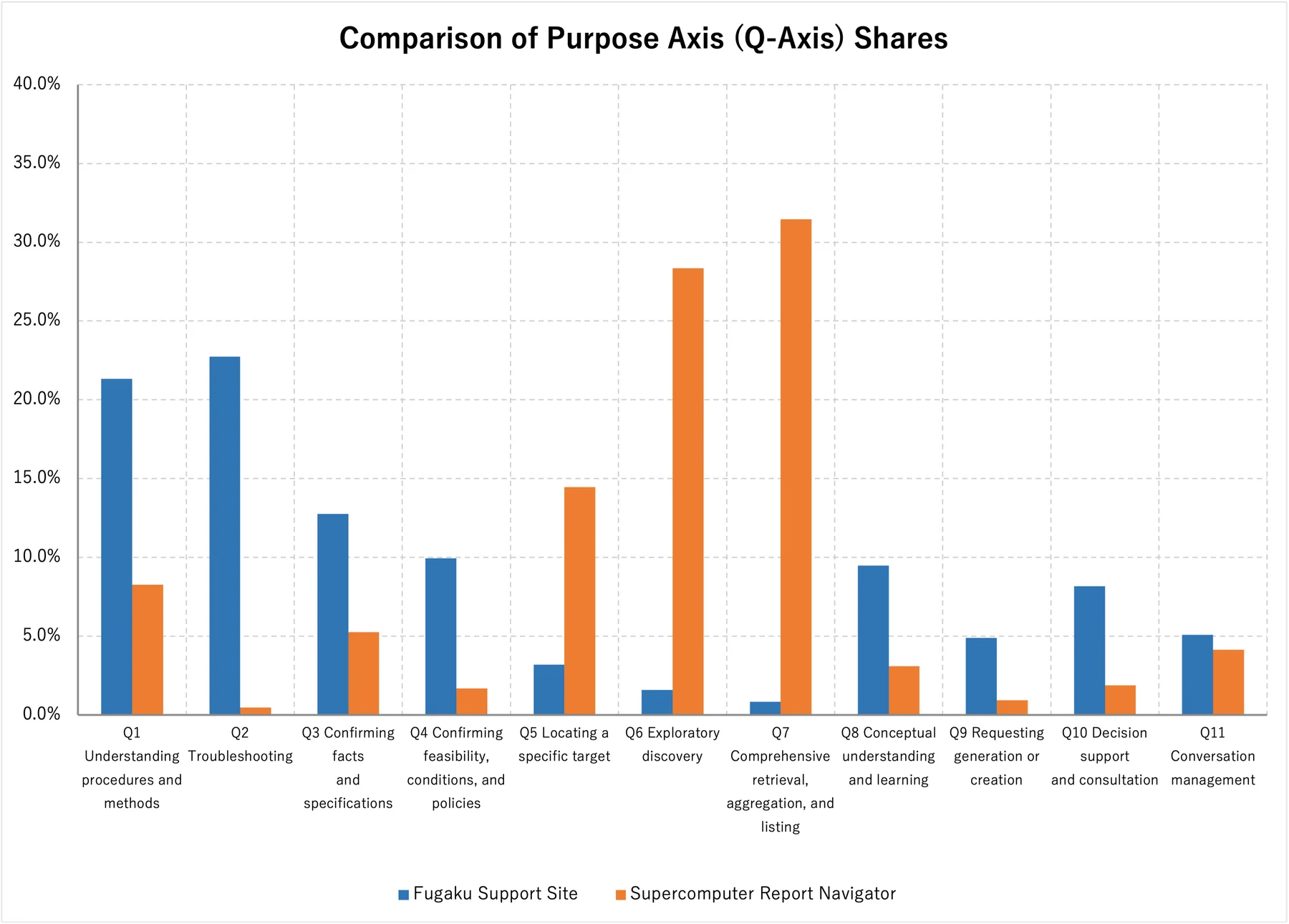
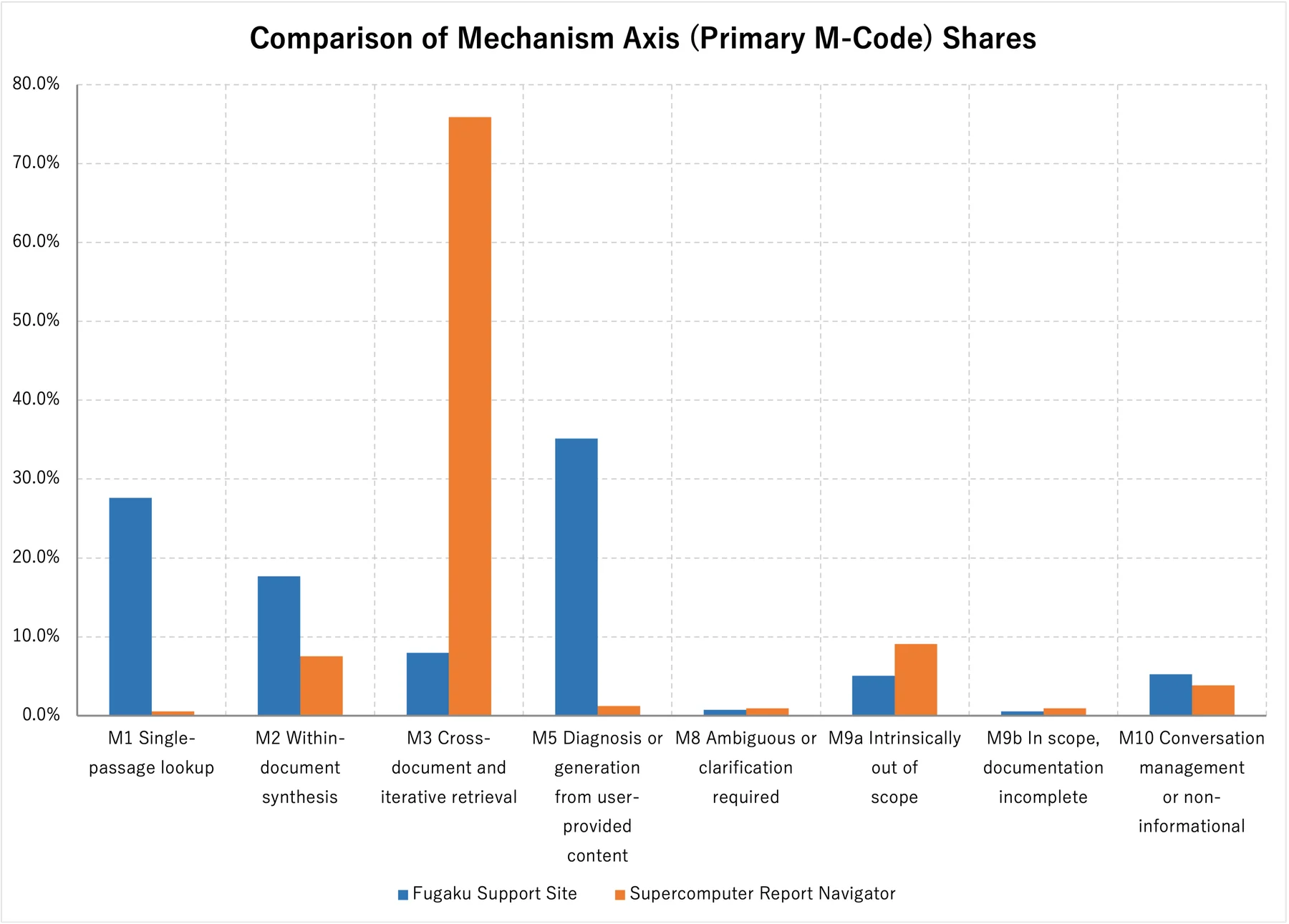
On the Fugaku Support Site, troubleshooting (Q2: 22.7%) and learning procedures (Q1: 21.3%) are especially common. On the mechanism axis, diagnosis of user-provided content (M5: 35.1%) and single-location reference (M1: 27.6%) account for most queries. This reflects highly practical and specific technical-support use, such as resolving errors encountered while using the system and learning how to run a particular command.
In contrast, the Supercomputer Report Navigator is dominated by exhaustive retrieval, aggregation, and listing (Q7: 31.5%) and exploratory discovery (Q6: 28.4%). On the mechanism axis, multiple documents or sequential search (M3: 75.9%) is especially prominent. This supports the view that the platform functions as a research and discovery tool for searching across past research results and papers and investigating trends related to particular technical fields or companies from a broad perspective.
For details of this query analysis, see Section 2 of Use of Generative AI in User Support for RIKEN's Supercomputer Fugaku: 24 Months of AskDona Operations and Query Analysis.
8. Conclusion
As this article has shown, LLM-based query classification does not end when a prompt is sent to an LLM. Consistently classifying thousands or tens of thousands of records in production requires clear classification criteria, a deliberate division of responsibilities between AI and conventional programs, management systems that support large-scale processing, and a workflow that incorporates human review.
The analyses of the Fugaku Support Site and the Supercomputer Report Navigator show the importance of managing ambiguous category boundaries, confusion between classes, insufficient context, and bias toward particular categories across the entire system while keeping the classification process traceable. Combining the LLM's contextual understanding, deterministic programmatic processing, and human expertise makes it possible to build a classification framework that remains usable at scale.
References
-
S. Parikh, M. Tiwari, P. Tumbade, and Q. Vohra, 'Exploring Zero and Few-shot Techniques for Intent Classification,' Proceedings of the 61st Annual Meeting of the Association for Computational Linguistics: Industry Track, 2023. ACL Anthology
-
T. Hong et al., 'Exploring the Use of Natural Language Descriptions of Intents for Large Language Models in Zero-shot Intent Classification,' Proceedings of the 25th Annual Meeting of the Special Interest Group on Discourse and Dialogue, 2024. ACL Anthology
-
P. Mirza, V. Sudhi, S. R. Sahoo, and S. R. Bhat, 'ILLUMINER: Instruction-tuned Large Language Models as Few-shot Intent Classifier and Slot Filler,' Proceedings of LREC-COLING 2024, 2024. ACL Anthology
-
J. Shin et al., 'Learning to Adapt Large Language Models to One-Shot In-Context Intent Classification on Unseen Domains,' CustomNLP4U, 2024. ACL Anthology
-
H.-C. Kuo and Y.-N. Chen, 'Zero-Shot Prompting for Implicit Intent Prediction and Recommendation with Commonsense Reasoning,' Findings of ACL, 2023. ACL Anthology
-
X. Song et al., 'Large Language Models Meet Open-World Intent Discovery and Recognition: An Evaluation of ChatGPT,' EMNLP, 2023. ACL Anthology
Appendix A.
procedure_v3.0.md - Operating Procedure for the LLM
Query Classification and Comparative Analysis Procedure for Claude Cowork
Document version: 3.0
Taxonomy version: 2.0, unchanged
Created: August 17, 2026
Scope: A stratified random sample of 1,065 Fugaku Support Site records and 1,065 Supercomputer Report Navigator records through June 30, 2026
Primary readers: Claude Cowork and GFLOPS team members reviewing the work
0. How to Use This Document
Claude Cowork must read this document in full before beginning work. In a new session, do not rely solely on prior conversation. Re-read this procedure, the manifest, progress file, and decision log.
This version replaces the full classification of all 12,285 Fugaku records specified in Version 2.0 with a reproducible stratified random sample of 1,065 records. The taxonomy, priorities, calibrated judgment prompt, K-axis, C-axis, and tier rules remain unchanged. Never retain judgment results only in chat. Save results to a file after each set of 100 production records so that a new session can resume without reclassifying completed batches.
0.1 Changes in Version 3.0
Item
Version 2.0
Version 3.0
Fugaku production records judged by the LLM
All 12,285 user messages
1,065 records stratified by quarter and database
Fugaku batches
123 batches
Normally 11 batches: ten batches of 100 and one batch of 65
Sampling method
None
Proportional allocation plus a fixed SHA-256 ranking
Progress
progress_fugaku.json
New progress_fugaku_sample_1065.json
Navigator comparison range
1,165 records through August 10, 2026; main aggregation used 926 spontaneous queries
Fixed at 1,065 records through June 30, 2026
Full-period Fugaku estimate
Observed value
Estimate using sample weights
Quarterly analysis
All records
Exploratory analysis; always report the sample size and uncertainty for each quarter

0.2 Items That Do Not Change
·       Taxonomy Version 2.0
·       judge_prompt_v2.5.md
·       gold_set_v3.tsv
·       session_anchors_fugaku.tsv
·       k_axis_rules_v1.json
·       Definitions of the M-axis, Q-axis, K-axis, C-axis, and tiers
·       Completed labels for the Supercomputer Report Navigator
0.3 Order of Authority
When documents conflict, use the following order:
1. 	This procedure, Version 3.0
2. 	Confirmed calibration round 5 decisions in 00_governance/decision_log_fugaku.md
3. 	judge_prompt_v2.5.md
4. 	taxonomy_v2.0.json and k_axis_rules_v1.json
5. 	Human-approved gold_set_v3.tsv
6. 	Procedure Version 2.0, outlines, and older Excel files
Do not apply the Version 2.0 instructions to classify all 12,285 Fugaku records or process 123 batches.
0.4 File-Safety Rules
·       Treat source JSON, existing normalized JSONL, completed Navigator files, and calibration files as read-only.
·       Do not delete, overwrite, or reuse the existing 03_batches/fugaku, 04_labels/fugaku, or progress_fugaku.json.
·       Use sample-specific filenames and subdirectories.
·       Do not print large JSON files in full. Process them as streams in Python.
·       Do not overwrite existing files in 00_governance. Only add new files and append to the decision log.
·       Do not delete source data or intermediate artifacts before final validation is complete.
1. Purpose and Analysis Design
1.1 Purpose
1. 	Compare queries from the Fugaku Support Site and the Supercomputer Report Navigator along the same four axes.
2. 	Limit Fugaku LLM judgments to 1,065 records while preserving a composition close to the 24-month population across Japanese and English databases.
3. 	Maintain reproducible records of sampling, judgment, weighting, and aggregation.
1.2 Comparison Populations
Supercomputer Report Navigator
·       Comparison period: August 25, 2025 through June 30, 2026, JST.
·       User messages: 1,065.
·       These 1,065 records are the complete set of user messages in the period, not a sample.
·       Extract by date from hpci_master_labeled.jsonl. Do not reclassify.
·       Exclude the 100 records from July 1 through August 10, 2026 from the comparison, but do not delete them from existing artifacts.
·       Of the 1,065 records, 238 are starter questions and 827 are spontaneous queries. Confirm these counts programmatically.
Fugaku Support Site
·       Population: 12,285 user messages from July 3, 2024 through June 30, 2026.
·       Population file: 02_normalized/fugaku_normalized.jsonl.
·       Production LLM judgment set: a stratified random sample of 1,065 records.
·       Strata: 16 combinations of quarter × db_or_language.
·       Sampling: proportional allocation followed by a fixed SHA-256 ranking.
·       Because the official Fugaku starter list is not final, retain the current starter_flag value of 0.
1.3 Why 1,065 Records?
The Supercomputer Report Navigator contains 1,065 user messages from its launch through June 30, 2026. Classifying the same number of Fugaku records limits the LLM workload while allowing comparison of classification composition.
Despite the equal record counts, the Navigator data contains every message in the period, while the Fugaku data is a sample. Do not compare total usage volumes from these counts. The primary comparison is between composition ratios.
1.4 Units of Analysis
·       Primary analysis: weighted classification composition for the 24-month Fugaku population compared with the observed composition of all 1,065 Navigator records.
·       Supplementary analysis: raw counts and unweighted composition of the 1,065-record Fugaku sample.
·       Time series: Fugaku composition by quarter. Treat quarters with small samples as exploratory.
·       Citation comparison: October 1, 2025 through June 30, 2026, when citation functions were stable on both sites. Exclude missing answers from the denominator.
2. Stratified Random Sampling of 1,065 Fugaku Records
2.1 Fixed Pre-Sampling Checks
Stop and report any discrepancy before sampling.
Item
Fixed value
dataset_version
fugaku_202407_202606_v1
Population size
12,285
fugaku_normalized.jsonl SHA-256
b35233c3c8ef6058187036478496b10e207120d77ba623b36dda76062f536051
input_manifest_fugaku.json SHA-256
2211dba908cd9174c347935d7c5328dc0bda1fc607c32b05df0e9f812a9323b6
judge_prompt_v2.5.md SHA-256
72a36ec451b053fe89ebc003030ad12db45c397903d0e0334035d32da420c3f5
gold_set_v3.tsv SHA-256
4c2e70d71ced67d47f3887866b09a8aa835286a9d0b3ed81af1faa3a037300c5
session_anchors_fugaku.tsv SHA-256
08e65a9bf9efc3c03819d9fcb57bb694ddefd77af1cb23b737fdfb0922f02485

2.2 Strata and Allocation
Each stratum is a combination of quarter and db_or_language. Use the Hamilton method, or largest remainder method. Calculate n_h = 1065 × N_h / 12285, assign the integer portions, then allocate the remaining records to strata in descending order of the fractional remainder. Break ties in ascending order of quarter and db_or_language.
Quarter
Database
Population N_h
Sample n_h
2024Q3
Japanese DB
1,504
130
2024Q3
English DB
173
15
2024Q4
Japanese DB
1,667
145
2024Q4
English DB
181
16
2025Q1
Japanese DB
1,595
138
2025Q1
English DB
297
26
2025Q2
Japanese DB
1,347
117
2025Q2
English DB
131
11
2025Q3
Japanese DB
1,346
117
2025Q3
English DB
148
13
2025Q4
Japanese DB
692
60
2025Q4
English DB
46
4
2026Q1
Japanese DB
969
84
2026Q1
English DB
63
5
2026Q2
Japanese DB
1,828
158
2026Q2
English DB
298
26
Total

12,285
1,065

Quarterly sample sizes are 145 for 2024Q3, 161 for 2024Q4, 164 for 2025Q1, 128 for 2025Q2, 130 for 2025Q3, 64 for 2025Q4, 89 for 2026Q1, and 184 for 2026Q2.
2.3 Fixed Sampling Method
Use a fixed hash ranking to avoid differences between pseudorandom-number library implementations:
1. 	Set the string seed to fugaku1065_v3_20260817.
2. 	For each row, join the seed, dataset_version, and uid with tab characters.
3. 	Apply SHA-256 to the UTF-8 bytes of the joined string and store the hexadecimal value as selection_hash.
4. 	Within each stratum, sort by selection_hash, then by uid, both ascending.
5. 	Select the first n_h records in each stratum.
6. 	Sort selected records by datetime_jst, then uid, before dividing them into batches.
This method always produces the same 1,065 records from the same population and seed. To create another sample, change the sampling version and seed without overwriting existing files.
2.4 Required Fields in the Sample File
Create 02_normalized/fugaku_sample_1065.jsonl and add the following fields to each normalized source record:
·       sampling_version: fugaku_stratified_1065_v1
·       sample_flag: 1
·       sample_stratum, for example 2024Q3__JapaneseDB
·       stratum_population_n: N_h
·       stratum_sample_n: n_h
·       inclusion_probability: n_h / N_h
·       sample_weight: N_h / n_h
·       selection_seed: fugaku1065_v3_20260817
·       selection_hash
Do not reassign sample UIDs. Retain the original FUG-###### values.
2.5 Sample Manifest
Create 01_manifest/sample_manifest_fugaku_1065.json and record at least:
·       Sampling version, creation timestamp, and creator
·       Population filename, count, and SHA-256
·       Sampling-script filename and SHA-256
·       Seed and hash expression
·       N_h, n_h, sampling rate, and weight for each stratum
·       SHA-256 of the selected UID list
·       Sample JSONL count, period, database and quarterly counts, and SHA-256
·       Zero duplicate UIDs and zero UIDs outside the population
2.6 Required Post-Sampling Validation
·       The sample contains 1,065 records.
·       All 1,065 UIDs are unique and exist in fugaku_normalized.jsonl.
·       Counts by stratum exactly match the table in Section 2.2.
·       Re-running the same script produces the same SHA-256 for the sample UID list.
·       Creating the sample did not modify the population JSONL.
3. Taxonomy
Taxonomy Version 2.0 remains fixed.
3.1 Mechanism Axis M
Assign one primary code. The full definitions are the same as those in Section 5 of the article.
Code
Name
Summary
M1
Single-location reference
One search; one contiguous location within one document
M2
Integration within one document
Combine multiple locations within one topic or document
M3
Multiple documents or sequential search
Cross multiple documents, projects, or domains, or search again
M5
Diagnose or generate from user-provided content
Individually analyze or generate from pasted logs, code, values, or similar material
M8
Ambiguous or clarification required
Subject or intent remains unknown even with context
M9a
Inherently out of scope
Individual status, real-time information, general knowledge, and similar requests
M9b
In scope but documentation unavailable
In scope, but there is evidence that required documentation is absent
M10
Conversation management or non-informational
Greetings, human-support requests, dissatisfaction, correction instructions, and similar utterances

Priority: M10 > M9a > M9b > M8 > M3 > M5 > M2 > M1.
Assign each independent secondary flag as 0 or 1:
·       M4, exhaustive retrieval or aggregation: all records, counts, totals, rankings, lists, tables, or set extraction.
·       M6, negation or exclusion: "other than," "excluding," "without using," and similar conditions.
·       M7, time series or freshness: year, period, latest version, time of change, version differences, duration, and similar conditions.
Calculate tiers programmatically, not with the LLM. M1 is T1 unless any of M4, M6, or M7 equals 1, in which case it is T2. M2 and M3 are T2. M5, M8, M9a, M9b, and M10 are T3.
3.2 Evidence Rule for M9b
Because the LLM input does not contain the answer, do not infer M9b from the query alone. When evidence is insufficient, assign the closest code such as M1, M2, or M3, and add M9B to review_flag. After merging, programmatically extract rows whose answer_head_600 contains phrases such as "not found" or "not documented," then have a human confirm M9b. Preserve the original LLM label and record corrections in corrections.tsv.
3.3 Purpose Axis Q
Assign exactly one code per query.
Code
Name
Q1
Learn a procedure or method
Q2
Troubleshooting
Q3
Confirm a fact or specification
Q4
Confirm feasibility, conditions, or policy
Q5
Locate a specific target
Q6
Exploratory discovery
Q7
Exhaustive retrieval, aggregation, or listing
Q8
Conceptual understanding or learning
Q9
Request to generate or create
Q10
Judgment or consultation
Q11
Conversation management

Priority: Q11 > Q2 > Q9 > Q7 > Q6 > Q5 > Q10 > Q4 > Q1 > Q8 > Q3.
Treat judge_prompt_v2.5.md as authoritative for detailed boundary rules, especially Q3/Q8, Q2/Q9, Q1/Q3, Q4/Q3, Q4/Q10, Q5/Q6, Q6/Q7, and Q11.
3.4 K-axis, Theoretical K Value, and C-axis
·       Calculate the K-axis programmatically using k_axis_rules_v1.json, in the order K4 > K2 > K1 > K3.
·       Theoretical K values are Q1 and Q9 to K1; Q2 to K2; Q3 through Q8 to K3, except Q9; and Q10 and Q11 to K4.
·       The C-axis is C0 for zero referenced documents, C1 for one or two, C2 for three or four, and C3 for five or more.
·       Exclude missing answers from the C-axis denominator.
·       Limit cross-site C-axis comparison to October 2025 through June 2026.
4. Calibrated Judgment Gate
Fugaku calibration round 5 is complete, and the production gate has been cleared.
Scope
M agreement
Q agreement
216 Fugaku records
90.7%
90.3%
All 369 records
92.1%
93.2%

All nine records requiring Shiori's final judgment were confirmed as M2. No secondary-flag bias was found, and the Fugaku classifications contained zero unsupported M9b assignments. Do not repeat calibration or modify judge_prompt_v2.5.md or gold_set_v3.tsv.
5. Folders and Files
Retain all existing full-population files and add sample-specific files:
query_classification_v2/ ├── 00_governance/ │   ├── judge_prompt_v2.5.md │   ├── gold_set_v3.tsv │   ├── session_anchors_fugaku.tsv │   ├── sampling_plan_fugaku_1065_v1.json │   └── next_session_prompt_production_sample1065.md ├── 01_manifest/ │   ├── input_manifest_fugaku.json │   ├── sample_manifest_fugaku_1065.json │   └── progress_fugaku_sample_1065.json ├── 02_normalized/ │   ├── fugaku_normalized.jsonl │   └── fugaku_sample_1065.jsonl ├── 03_batches/ │   ├── fugaku/                     	existing 123 batches; do not modify │   └── fugaku_sample_1065/ ├── 04_labels/ │   ├── fugaku/                     	existing full-population files; do not modify │   └── fugaku_sample_1065/ ├── 05_merged/ │   ├── hpci_master_labeled.jsonl │   ├── hpci_to_20260630_labeled.jsonl │   └── fugaku_sample_1065_master_labeled.jsonl ├── 06_review/ │   ├── sample1065/ │   └── corrections_sample1065.tsv ├── 07_outputs/ │   ├── query_comparison_to_20260630_sample1065_v1.xlsx │   └── fugaku_sample_1065_detail_v1.xlsx └── scripts/ 	├── sample_fugaku_1065.py 	├── make_batches_fugaku_sample_1065.py 	├── validate_labels_fugaku_sample_1065.py 	├── merge_labels_fugaku_sample_1065.py 	└── build_summary_sample1065.py
Do not directly overwrite existing scripts. Create sample-specific scripts or new parameterized versions with configurable input and output locations.
6. Batch Generation
6.1 Basic Unit
·       Use 100 production records per batch.
·       Add 20 Fugaku anchors to the beginning of every batch.
·       For 1,065 records, normally use 11 batches. B0001 through B0010 contain 100 production records; B0011 contains 65.
·       Exclude anchors from aggregation.
6.2 Batch Format
Use UTF-8, tab-separated text with a header:
uid	dataset	turn    query_for_judge    context_for_judge
Set dataset to fugaku_sample_1065. Fix sample order by ascending datetime_jst, then uid.
6.3 Batch Validation
·       Production rows across all batches total 1,065.
·       There are zero duplicate production UIDs.
·       The UID set exactly matches the sample JSONL.
·       Order within each batch matches batch_index.json.
·       Each batch is no more than 1 MB. If a batch exceeds this limit, split only that batch and update total batch counts in the manifest and progress file.
·       The existing 03_batches/fugaku directory is unchanged.
7. Production LLM-as-a-Judge Classification
7.1 Fixed Prompt
Use 00_governance/judge_prompt_v2.5.md unchanged. Stop if its SHA-256 does not match Section 2.1.
Provide each judging sub-agent only these three resources:
1. 	Section 3 of this procedure
2. 	judge_prompt_v2.5.md
3. 	The assigned batch TSV
Do not provide the gold set, earlier predictions, decision log, or correct anchor-answer columns.
7.2 Fugaku Assumptions
State the following to each judging sub-agent:
All records are Fugaku Support Site logs. The corpus contains Fugaku user manuals, FAQs, and operational notices. Diagnosis of pasted logs or code is M5. Individual account status, remaining capacity, real-time outages, general Linux knowledge, internal specifications of external open-source software, and the chatbot's own specifications are M9a. Fugaku operations, jobs, compilers, storage, and related matters are central to the supported scope.
7.3 Execution Unit
·       Run no more than six sub-agents concurrently.
·       Process six batches in the first group and the remainder in the second.
·       Save each batch directly to 04_labels/fugaku_sample_1065/labels_B####.tsv.
·       Do not paste judgments into chat.
·       Output exactly seven columns with no header: uid, m_main, m4, m6, m7, q_code, review_flag.
7.4 Required Validation for Every Batch
·       Input and output row counts match.
·       UID sets and order match.
·       There are zero duplicate UIDs.
·       Every M primary code and Q code is permitted.
·       M4, M6, and M7 are either 0 or 1.
·       Every review_flag is permitted.
·       Every row has seven columns.
·       Anchor M primary-code and Q-code agreement is at least 95%.
If validation fails, repair only that batch. Do not reclassify earlier valid batches.
7.5 Stop Conditions
·       The validator fails three times on the same batch.
·       Anchor agreement remains below 95% for two consecutive attempts.
·       The M9b assignment rate exceeds 3%.
·       The M/Q distribution differs substantially from calibration results or known Fugaku patterns.
·       A UID outside the sample appears in the labels.
When stopping, record all valid batches in progress and resume next time with only the unprocessed batches.
8. Progress and Resumption
Create 01_manifest/progress_fugaku_sample_1065.json. Do not reuse progress_fugaku.json.
Required fields are dataset_version, sampling_version, taxonomy_version, prompt_file, prompt_sha256, sample_manifest_sha256, sample_jsonl_sha256, total_sample_rows, total_batches, completed_batches, failed_batches, next_batch, batch_anchor_agreement, and last_updated_jst.
Update progress after each group. To resume:
1. 	Read this procedure.
2. 	Read the sample manifest and progress file.
3. 	Reconcile actual files in 04_labels/fugaku_sample_1065 with completed_batches.
4. 	Revalidate valid files but do not reclassify them.
5. 	Continue from next_batch.
9. Merge and Programmatic Classification
Join only the sample JSONL and sample labels to create fugaku_sample_1065_master_labeled.jsonl. Preserve or add the sampling information and sample_weight, original LLM labels, final labels after corrections, M/Q category names, tier, K code, theoretical K value and K agreement, C code, label batch, prompt version, taxonomy version, sampling version, and review_status.
Exclude anchor rows. The master must contain exactly 1,065 records.
From hpci_master_labeled.jsonl, extract records through June 30, 2026 JST to create hpci_to_20260630_labeled.jsonl. Do not modify the existing master. Programmatically confirm 1,065 records, including 238 starter questions and 827 spontaneous queries.
10. Human Quality Review
Treat the complete sample as one review block and review:
·       100 randomly selected records using a fixed seed
·       Every record with a review_flag
·       Every M9B candidate
·       Every record classified as M9b by the LLM
·       Every record with two or more of M4, M6, and M7
·       Records matching Q-boundary patterns that were persistent in calibration rounds 4 and 5
·       At least ten records from each quarter, allowing overlap with the sets above
·       Records from both Japanese and English databases
Do not edit the original label TSVs. Append corrections to 06_review/corrections_sample1065.tsv. If the correction rate exceeds 10%, or if the same boundary error occurs in three consecutive cases, do not finalize the aggregation until the cause has been investigated. If the taxonomy must change, increase its version and reclassify the affected scope.
11. Weighted Aggregation
11.1 Full-Period Fugaku Composition
Let N_h be the population size in stratum h, n_h the sample size, and y_hi a category indicator. Estimate the Fugaku population proportion as:
P_hat = sum_h [N_h × (sum_i y_hi / n_h)] / 12,285
The same result may be calculated at record level using sample_weight = N_h / n_h.
Report in the main table:
·       Raw sample count, denominator 1,065
·       Weighted proportion
·       Estimated population count, 12,285 × weighted proportion, explicitly labeled as an estimate
·       Standard error or 95% confidence interval
Calculate with unrounded values and round only for display. Because rounded weighted category counts may differ from 12,285 by several records, treat the proportions as authoritative.
11.2 Supercomputer Report Navigator
Because the 1,065 Navigator records are the complete period population, use ordinary counts and proportions and do not add sampling-error confidence intervals. The main comparison uses all 1,065 records on each side. Also present the composition of the 827 non-starter queries as a sensitivity analysis. Note that the official Fugaku starter list is not final.
11.3 Cautions for Quarterly Analysis
Proportional allocation produces quarterly samples of 64 to 184 records. Using a simple approximation near a 50% proportion, the quarterly 95% margin of error is approximately plus or minus 7 to 12 percentage points. Do not interpret changes of only a few points as meaningful.
In particular, 2025Q4 contains 64 records and only four English-database records. Do not discuss quarterly composition for the English database in isolation. Analyze database differences primarily over the full period.
11.4 Comparison Cautions
·       Although both sets contain 1,065 records, the Navigator set is a census for the period and the Fugaku set is a sample.
·       The periods differ: Fugaku covers 24 months, while the Navigator covers approximately 10 months.
·       Do not compare total counts or monthly averages on the basis of equal sample sizes.
·       Report composition differences as Fugaku weighted proportion minus Navigator observed proportion.
·       State that usage and classification composition are associated; do not claim causation.
·       Keep M9a and M9b separate so that improved routing is not confused with adding documentation.
12. Excel Deliverables
12.1 Comparison Summary
Create 07_outputs/query_comparison_to_20260630_sample1065_v1.xlsx without overwriting query_comparison_summary_v1.xlsx.
Recommended sheets are Summary, Classification Definitions, Sampling Design, Fugaku Aggregation, Navigator Aggregation, Two-Site Comparison, Quarter, Database and Language, Citation Comparison, Quality Review, and File Index. The Fugaku sheet must show raw counts, weighted proportions, and confidence intervals. The Navigator sheet must show all 1,065 records and the 827-record non-starter sensitivity analysis.
12.2 Fugaku Sample Detail
Create 07_outputs/fugaku_sample_1065_detail_v1.xlsx. Include the existing 33 columns plus sampling_version, sample_stratum, stratum_population_n, stratum_sample_n, inclusion_probability, sample_weight, and selection_hash.
Limit queries to 2,000 characters and answers to the first 600 characters. Do not wrap long cells. Freeze the top row, enable filters, and prevent formula injection.
12.3 Required Validation
·       Fugaku detail contains 1,065 records.
·       Navigator comparison set contains 1,065 records.
·       Fugaku counts by stratum match Section 2.2.
·       M primary-code and Q-code totals are each 1,065.
·       Weights sum to approximately 12,285.
·       Weighted proportions for each axis sum to 100%.
·       There are zero formula errors.
·       Aggregate values match independent aggregation from the master JSONL.
·       Existing Excel files have not been overwritten.
13. Final Deliverables and Completion Criteria
The work is complete when all of the following exist:
1. 	Sampling script and sampling plan
2. 	Sample manifest
3. 	Fugaku sample JSONL with 1,065 records
4. 	Sample batches and batch index
5. 	Validated labels for every batch
6. 	Anchor agreement of at least 95% for every batch
7. 	Sample master JSONL with 1,065 records
8. 	Navigator comparison JSONL with 1,065 records through June 30, 2026
9. 	Human review and corrections
10.  Comparison summary workbook and Fugaku sample-detail workbook
11.  Sampling design and execution results appended to decision_log_fugaku.md
12.  A state from which a new session can resume using the manifest and progress file
14. Starting Instructions for Claude Cowork
Use 00_governance/next_session_prompt_production_sample1065.md to begin production judgment.
Aim to complete sampling, batch generation, and classification of all 11 batches in one session, but perform merging and Excel generation in separate sessions. If usage limits are near, save valid labels and progress, stop, and defer only the unprocessed batches.
15. Reference Materials
Material
Role
Procedure Version 2.0
Full-population version; reference for taxonomy definitions and technical cautions
next_session_prompt_round5.md
Reference for calibration round 5 instruction format
next_session_prompt_production_s1.md
Full-population production instructions; do not reuse its batch range in Version 3.0
decision_log_fugaku.md
Confirmed decisions through calibration round 5
calibration_summary_fugaku_round5.json
Evidence supporting clearance of the production gate
query_comparison_summary_v1.xlsx
Existing Navigator summary; Version 3.0 resets the comparison range through June 30, 2026
hpci_detail_00001_01165_v1.xlsx
Navigator detail; preserve the existing 1,165 records and create the comparison set by date

16. Change Management
When changing the strata, allocation, seed, hash expression, comparison period, starter allowlist, taxonomy, or judgment prompt, record the before-and-after values, rationale, affected scope, and need for resampling or reclassification in decision_log_fugaku.md.
If the seed or sampling method changes, increase the sampling version. If taxonomy definitions change, increase the taxonomy version. Do not overwrite existing samples or labels.
This revision changes the analysis population and sampling design, not the taxonomy. Taxonomy Version 2.0 remains in effect.
Appendix B.
judge_prompt_v2.5.md - LLM Judgment Prompt
You are the judge for AskDona query classification.
Treat Section 3 of procedure_v2.0.md as authoritative and judge each input query independently.
Assign:
1. 	One M primary code: M1, M2, M3, M5, M8, M9a, M9b, or M10
2. 	M4 flag: 0 or 1
3. 	M6 flag: 0 or 1
4. 	M7 flag: 0 or 1
5. 	One Q code: Q1 through Q11
6. 	review_flag: enter only when the judgment is unstable
M primary-code priority: M10 > M9a > M9b > M8 > M3 > M5 > M2 > M1.
Q-code priority: Q11 > Q2 > Q9 > Q7 > Q6 > Q5 > Q10 > Q4 > Q1 > Q8 > Q3.
Important:
·       M4, M6, and M7 are independent flags, not primary codes. Set every applicable flag to 1.
·       Q11 applies only to non-informational conversation management. Classify an out-of-scope information request according to its actual Q purpose.
·       Assign M9b only when evidence is available. If evidence is insufficient, assign the closest M code and write M9B in review_flag.
·       Do not output reasons or explanations.
·       Do not change the input order.
Boundary Rules, Version 2.5
The taxonomy definitions themselves are unchanged.
M-axis
·       M1 versus M2: Use M1 when one value, definition, or single-command usage can be answered from one location. A method completed with one command or one parameter specification is also M1. Use M2 when multiple procedural steps, prerequisites, or settings must be combined from within one document.
·       M3: Use when multiple documents, projects, or manual domains must be crossed.
·       M5 versus M9a: Use M5 when the user pastes their own logs, code, command output, or text and requests diagnosis or rewriting. Do not use M9a. Use M9a when there is no pasted content and the user asks about facts or procedures outside the target corpus.
·       M8 versus M10: Use M10 for greetings, thanks, human-support requests, dissatisfaction with an answer, and clear correction instructions. Use M8 when an utterance consists only of a demonstrative or correction instruction and its intent cannot be determined without unavailable preceding context; add CTX to review_flag.
·       M9b: Assign only when an answer or context confirms that the request is in scope but the relevant material does not exist.
M Secondary Flags
·       M4: Judge independently of the Q code. Set to 1 when the answer requires a count, total, ranking, top N, list, table, all records, or extraction of a set satisfying conditions. Also set to 1 when multiple examples, projects, or documents must be collected, including requests using words such as "summarize," "enumerate," "extract," or "list," and when multiple project numbers or identifiers are queried together. Set to 0 for an explanation of one target and for a recommendation or judgment that does not require exhaustive retrieval, such as "Recommend two people."
·       M6: Set to 1 when an exclusion operation is required, including "other than," "excluding," "without using," and "not applicable."
·       M7: Set to 1 for filtering by fiscal year or period, trends, the latest version, time of change, differences between versions, duration, and other temporal reasoning. If "year conducted" merely appears as a requested output field without temporal filtering or trend analysis, set M7 to 0.
Q-axis
·       Q5 versus Q6: Use Q5 when the user names a project number, person, organization, product, software package, or document and wants to reach that target. A location question is also Q5. Use Q6 when the user begins with a field or theme and searches for examples or research that have not yet been identified.
·       Q6 versus Q7: Use Q7 when the user explicitly asks for counts, lists, tables, all records, top N, or rankings. Also use Q7 when the user requests a set based on structural conditions that do not name targets, such as year, numerical threshold, or identifier prefix. Thematic exploration remains Q6 even if the request says "summarize."
·       Q5 versus Q7: Use Q5 when the user names a company, institution, person, or project number and asks for examples, achievements, or reports related to that target. Move to Q7 only when the user explicitly asks for a count, ranking, list, or table.
·       Q3: Use only for pure factual confirmation that does not fall under another category.
Boundary Rules Added in Version 2.3
These rules supplement technical-support logs without changing the definitions.
M1 versus M2
Use M1 for:
·       Usage or value of one command, option, environment variable, or parameter
·       Default and maximum values of one setting
·       Meaning of one error code, exit code, or status value
·       A list obtainable from one table or one contiguous section, such as a resource-group list or exit-code list
·       A single command that performs a check
·       Multiple values that can all be answered from one table or contiguous section
Use M2 for:
·       Multiple steps that must be arranged in sequence from installation through configuration and execution
·       Answers combining prerequisites, steps, and cautions
·       Explanations of one function that combine an overview, limitations, examples, and other sections
When uncertain, use M1 if one table or contiguous section is sufficient, and M2 if multiple sections must be combined.
M2 versus M3
·       Use M2 when the request remains within one function, command, domain, or application.
·       Use M3 when it crosses different manuals, such as a user guide and command reference; compares two or more targets; or combines two different technologies. Questions such as "Which should I use, A or B?" and "What is the difference between A and B?" are M3.
Scope of M5
·       Even without pasted content, use M5 when the user describes their own environment, result, setting, or computational conditions and requests tailored diagnosis, correction, configuration, code, or instructions.
·       Requests to create or revise sample code or scripts are M5 even when the target is external open-source software. Do not use M9a.
Scope of M9a, Interpreted Narrowly
·       Use M9a only for an individual's account status, remaining capacity, actual allocation or consumption, application statistics, real-time outages, general knowledge unrelated to the target system, internal specifications of another company's product, or the chatbot's own specifications and use.
·       How to use, configure, or work within limitations of software provided on the target system, including compilers, MPI, Spack, applications, and job schedulers, is in scope. Do not use M9a.
Scope of M8, Interpreted Narrowly
·       A query consisting of one word or short phrase is not M8 if it is a real command, function, domain, institutional term, or technical term from which a search can be formed.
·       Use M8 only when the subject remains unidentifiable even with preceding context or when the sentence is truncated and the request cannot be determined. Add CTX to review_flag.
Q2 versus Q3
·       Use Q2 when the user shows an actual error or warning containing a concrete event such as a rank, node ID, path, or command output and asks for the cause, meaning, or resolution.
·       Use Q3 when the user provides only the name of an error or exit code and asks what it means, such as "What is PLM0026?" or "What is PC=23?"
·       A question that asks only whether an outage or error occurred is also Q3.
Q3 versus Q8
·       Use Q8 when the user wants to understand a term, concept, mechanism, reason, or difference, including "What is...?", "Why...?", and "What is the difference...?"
·       Use Q3 to confirm a value, specification, location, or other fact.
Q1 versus Q3
·       Use Q3 when the user asks for a command name, option name, or setting value itself.
·       Use Q1 when the user asks how to use it to perform a task.
Q4 versus Q3
·       Use Q4 for feasibility, conditions, or policy: "Can I...?", "May I...?", "Are there restrictions?", or "What conditions apply?"
·       Use Q3 for the number or specification itself: "What is the limit?" or "What is the value?"
Q4 versus Q10
·       Use Q10 when the user asks whether their understanding or plan is appropriate, or asks for a recommendation, choice, or improvement.
·       Use Q4 when the user asks only whether something is permitted or possible under a policy or specification.
Additional Q5 versus Q6 Guidance
·       Use Q5 when the user names a document, command, product, or software package and wants to reach it, or asks for a contact or location.
·       Use Q6 when the user starts from a theme or goal and searches for an unidentified document, tool, or example, such as "Is there a document that explains...?" or "Is there a tool that can...?"
Boundary Rules Added in Version 2.4
These rules address areas where calibration round 2 disagreements were concentrated. Definitions remain unchanged.
Scope Assigned to M1
·       Use M1 for feasibility, permission, limits, or policy when one rule or condition determines the answer. Examples include whether a deputy representative can perform an action, whether software can be installed in the user's own folder, whether data is deleted when reduced with a particular command, and whether a tool can be used on Fugaku.
·       If a question names one command, option, or specification method and asks about its usage or syntax, keep M1 even if the answer contains several syntax examples or patterns.
·       Use M1 for a definition or explanation of one named program, usage category, or storage area, such as low-priority use or the 2ndfs area.
Note: Version 2.5 replaced the Version 2.4 limitation that reserved M2 only for sequential multi-step procedures or answers combining prerequisites, procedures, and cautions. That limitation over-classified queries as M1.
Cases That Must Be M3
·       Use M3 when the requested document or example is not identified and must be found across multiple documents, as in "Which document contains...?", "Is there a document explaining...?", or "Are there examples or results of...?" Even a Q5 request to reach a named document is M3 if the system must first determine which document it is.
·       Use M3 for questions that cross two different systems, technologies, or domains, such as Fugaku and HPCI shared storage, or a compiler and application-specific settings.
Cases That Are Not M5
·       Do not use M5 for a general feasibility or procedure question that provides no user-specific state, conditions, or artifact.
·       Conversely, use M5 when the user provides an actual error message, command output, script, or personal execution conditions, even if the topic appears in official documentation.
Clarified Scope of M9a
Use M9a only for individual account status, remaining capacity, historical allocation or usage, operational statistics such as application counts, real-time outages, programming-language syntax or standard-library usage, general Linux or shell knowledge, current information outside the corpus such as the latest external-product release, and the chatbot's own specifications or use.
Installation, configuration, execution, and removal of software provided on the target system, including compilers, MPI, Spack, job schedulers, and applications, are in scope and must not be M9a.
Adjusted Q1 versus Q3 Rule
·       Use Q1 when the user asks for a means to achieve a goal. This includes not only "How do I...?" but also requests for a command or option as a means, such as "Which command checks...?" or "Which option should I use to...?"
·       Use Q3 when the user asks about the specification, arguments, setting value, or meaning of an output field for the command or option itself, or asks for a value or fact.
Boundary Rules Added in Version 2.5
Calibration round 3 disagreements were concentrated at the M2/M1 boundary. Version 2.4 had broadened M1 too far and moved questions that should have been M2, because they require multiple passages about one topic, into M1. Decide between M1 and M2 solely by whether the answer is complete in one location or requires multiple locations within the same document or topic.
Cases That Must Be M2
1. 	Combining multiple options or settings
   Use M2 when the user asks how to enable or specify two or more compiler options, environment variables, job-script directives, or settings together. The answer must combine separately documented items into one specification. Example: how to write compiler options that enable an optimization level, OpenMP, and output options together.
2. 	Two or more work stages
   Use M2 when the goal requires two or more sequential stages, such as creation and execution, writing and submission, or configuration and confirmation. Creating and submitting a job script is included. Examples include running a job in the background and keeping login-node processing active after disconnection.
3. 	Multiple restrictions or cautions for one function or theme
   Use M2 when the answer must gather several dispersed restrictions, cautions, or conditions of use for one function. A definition or single value for the same subject remains M1. Example: "What are the restrictions on using 2ndfs?" is M2, while "What is the 2ndfs area?" is M1.
4. 	Multiple decision factors for one theme
   Use M2 when the answer is determined by a combination of factors such as priority, resource amount, setting, or institutional category rather than one value. This applies even to a one-term query. Example: "job execution order," which depends on priority, resource group, submission status, and other factors.
5. 	Guidance and reasoning beyond simple feasibility
   Even when asking about feasibility or a recommendation, use M2 if the answer requires combining performance characteristics, optimization principles, or several viewpoints into guidance. Keep M1 if one rule or passage determines feasibility. Example: "Should I avoid if and while statements?" is M2 because it requires tuning guidance, while "Should compilation be performed on a compute node?" is M1 because one rule determines the answer.
6. 	Institutional conditions involving multiple rules, or feasibility requiring prerequisites
   Use M2 for paid use, applications, continuation or migration of projects, transfer of permissions, and similar matters in which the answer combines multiple regulations or conditions. Also use M2 when a question asks whether prerequisites or preparation are required for a multi-step task described in the preceding context. Examples include paid use, retrieving data after a continuing project is accepted, continuing the current project, and whether an environment must be created before a task.
   Keep M1 when one permission or feasibility rule determines the answer, such as whether a deputy representative can act or whether the user can install software in their own folder.
Cases That Remain M1
The following do not override the six mandatory M2 cases above:
·       A question naming one command, option, or environment variable and asking about its usage, arguments, or syntax
·       A question asking for one value, limit, default, definition, error code, or exit-code meaning
·       A list obtainable from one table or one contiguous section
·       A procedure completed with one command or one specification
Final Decision When Uncertain
·       If one location in the same document, meaning one table, section, or rule, is sufficient, use M1.
·       If multiple locations within the same document or topic must be combined, use M2.
·       If separate documents, manual domains, or targets must be crossed, use M3.
Output only the following seven tab-separated columns, with no header:
uid, m_main, m4, m6, m7, q_code, review_flag
review_flag must be blank or contain one or more of these values separated by semicolons:
M2_M3, M5_M9B, Q3_Q4, Q5_Q6, Q6_Q7, CTX, OTHER